Disclosure: Our experts test apps for security before recommending them. If you buy through our links, we may earn a commission. See how it works.
🛡️ VPN RECOMMENDATION
Our Recommended VPN - Surfshark
Your ISP sees every stream. Unverified apps expose your IP. Fix both in under 2 minutes.
🔒 30-day money-back guarantee • $0.06/day

2 Ways to Watch Super Bowl LX on FireStick
I’m sharing 2 methods that will let you watch the Super Bowl LX on FireStick for free from anywhere in the world:
- Watch Super Bowl LX on FireStick Using Downloader App
- Watch Super Bowl LX on FireStick Using Silk Browser
How to Watch Super Bowl LX on Firestick Using Downloader App
Channel 5 will be streaming Super Bowl LX for free in the UK via the My5 app. While the My5 app is available on the Amazon Appstore, the easiest way is to sideload it using the Downloader App.
However, the service is only available in the UK. So you must install SurfShark VPN on FireStick and connect it to the UK server to access it outside UK.
Follow the steps below:
Step 1: Turn ON your FireStick device and Go to FireStick Home

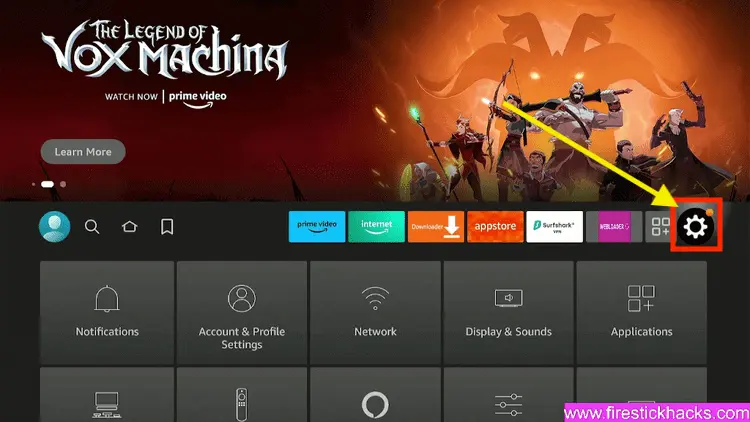
Step 2: Click on the Settings icon
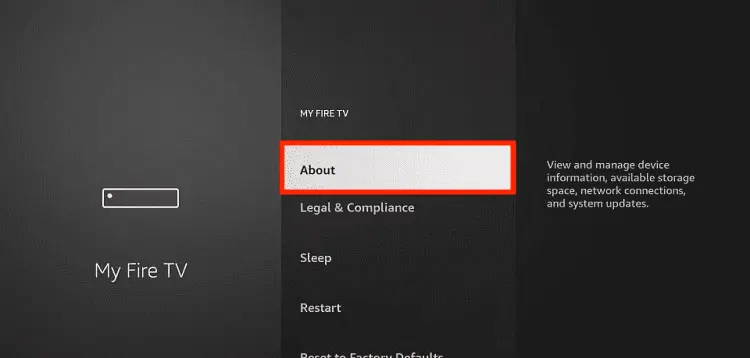
Step 3: Select the My Fire TV option

Step 4: To enable the Developer Option, click About.
Note: If you have already enabled the Developer Option, then proceed to Step 10
Step 5: Click on the Fire TV Stick option quickly at least 7 times

Step 6: Now you will see this message at the bottom saying "No need, you are already a developer". So stop clicking then

Step 7: Now the Developer Option will appear in the menu so click on it
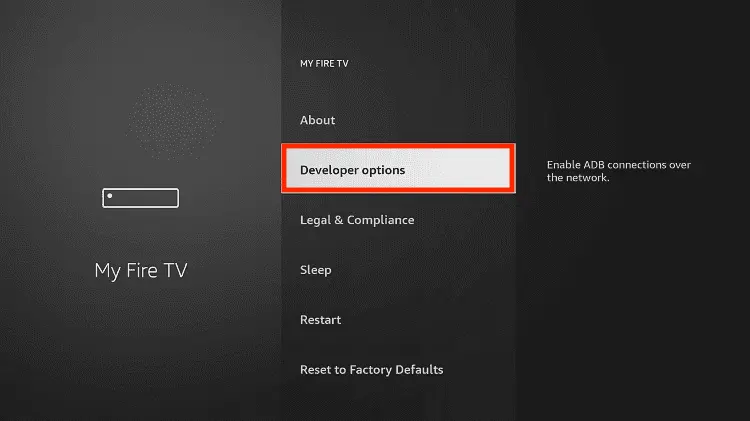
Step 8: Choose Apps from Unknown Sources to turn it ON

Step 9: Simply click Turn On

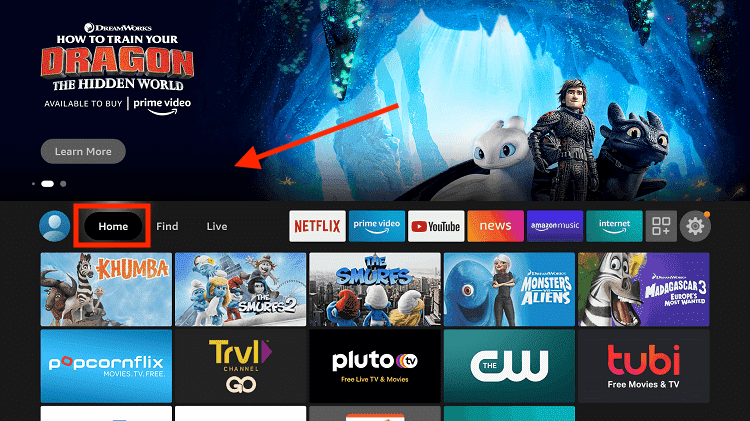
Step 10: Now return to the FireStick Home menu by pressing the "Home" icon on the remote and click on Find
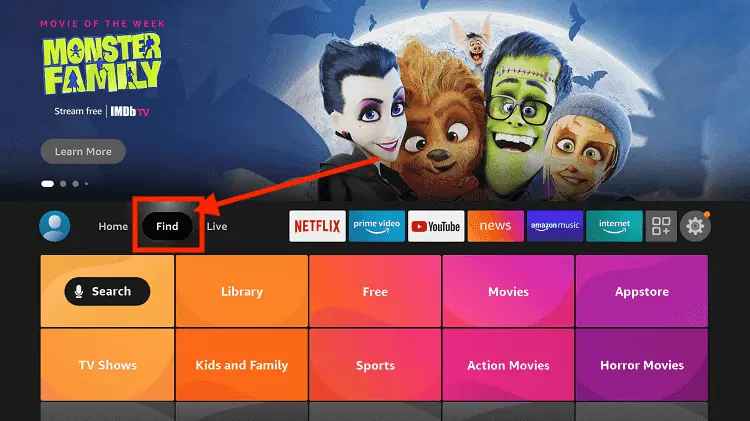
Step 11: Now select the Search icon
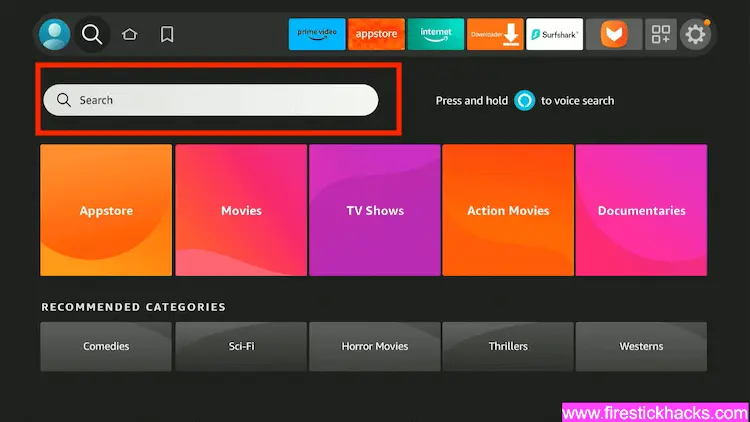
Step 12: Type Downloader and press search
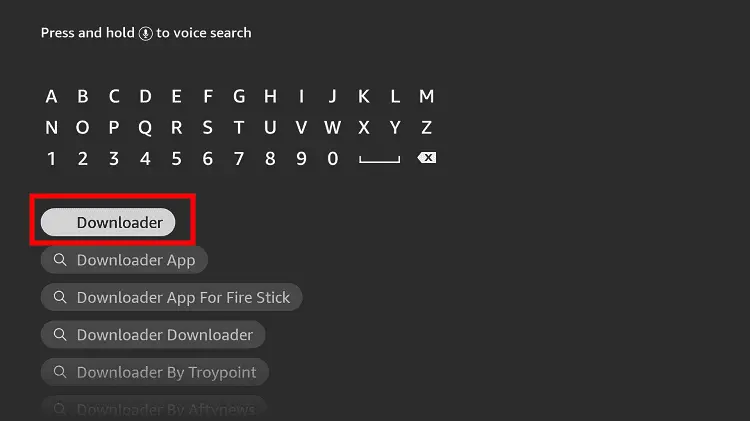
Step 13: Select the Downloader App icon from the list available in the Amazon Store

Step 14: Tap Get/Download
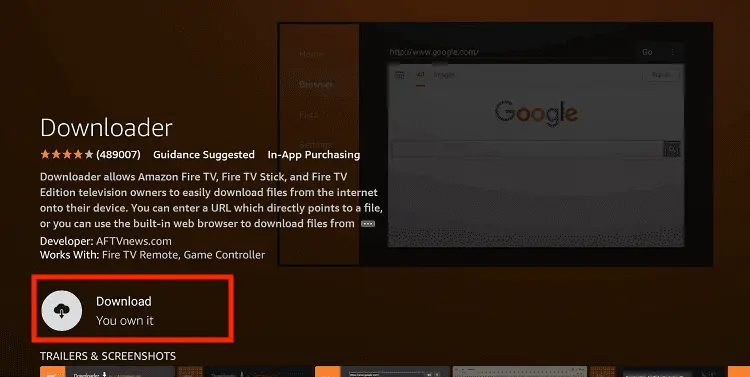
Step 15: Wait for a while until the installation process is completed
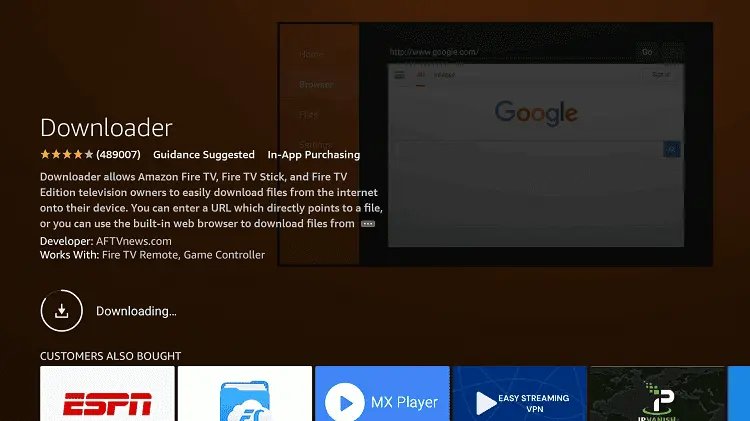
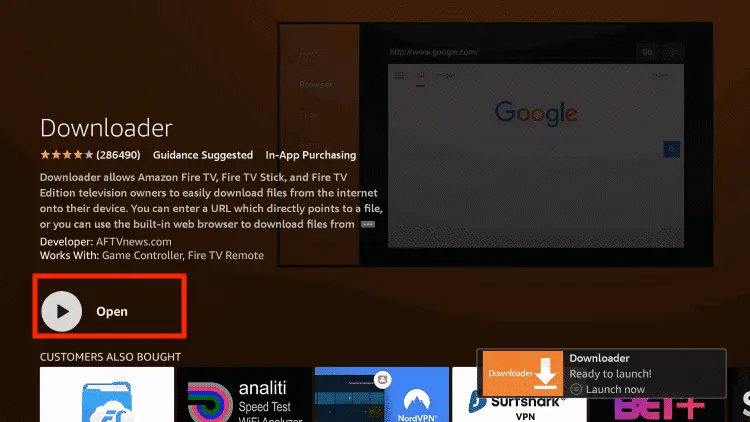
Step 16: Now click Open
Step 17: You will see a popup about Downloader app latest update. Click "OK".

Step 18: Click OK again

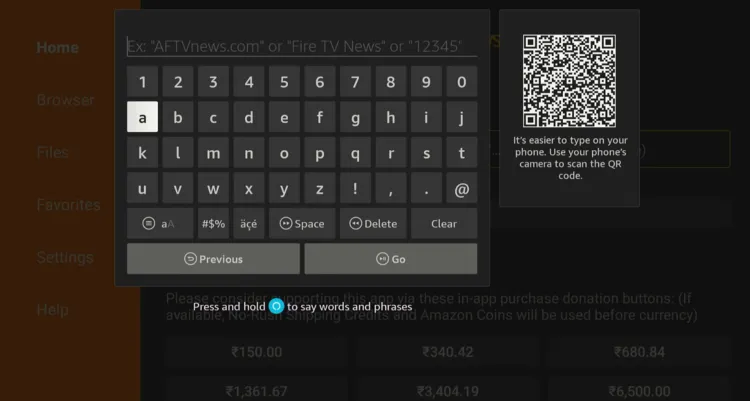
Step 19: This is the Downloader App interface, Click the Search Bar on top

Step 20: Now enter the My5 Downloader Code 730116 in the search box OR enter this URL bit.ly/fsh-downloads and click Go.
Note: The referenced link is the official URL of this app/website. FIRESTICKHACKS does not own, operate, or re-sell any app, streaming site, or service and has no affiliation with its developers.
Step 21: Scroll down and click “My5” from the “Live TV Apps” category.
Note: If the app does not start downloading, then clear the Downloader App cache using this article.

Step 22: The downloading will start. Wait for it to finish.
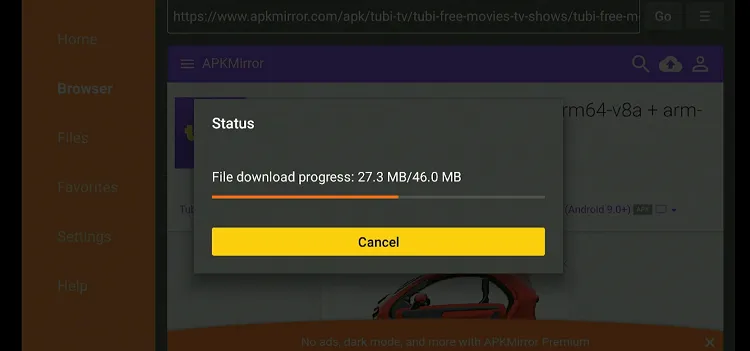
Step 23: Once the downloading ends, click “Install”.

Step 24: Tap the “Done” icon.

Step 25: Click “Delete” to remove the My5 APK file from FireStick.
Note: Deleting APK files will free up space on FireStick

Step 26: Select “Delete” again for confirmation.

Step 27: Open Surfshark and connect it to the UK server.

Step 28: Go to the FireStick home and select the “icon next to the settings” from the top right corner.
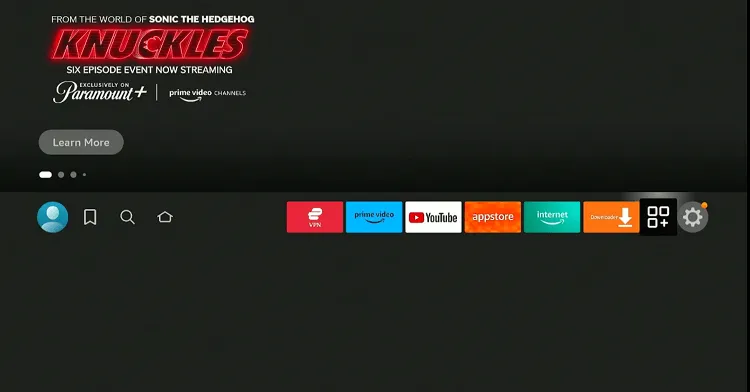
Step 29: Choose “My5” from the list.

Step 32: You will see the following window. Please note down the code.

Step 33: Now type my5.tv/activate on your laptop or PC browser.
P.S. Make sure to create an account to use My5. If you don’t have one, create it for free using the Channel5 official website.

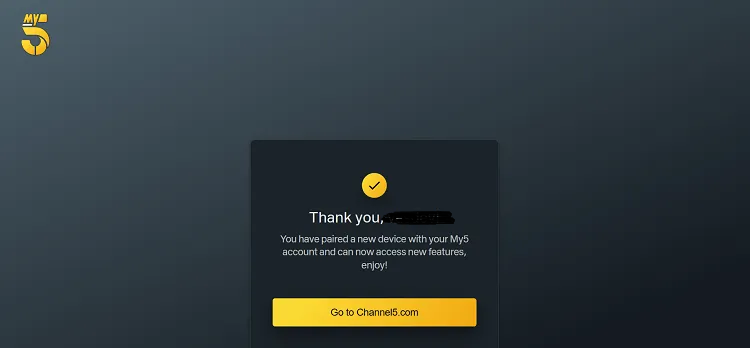
Step 34: You will see this pop-up, which means you have successfully signed into the My5 app.
Step 35: Go to the My5 app on your FireStick and select “Live TV” from the side menu.

Step 36: Choose Channel 5 to enjoy the live Super Bowl LX for free.

How to Watch Super Bowl on FireStick Using Silk Browser
If you don’t want to install the My5 app or face issues with it, you can still watch Super Bowl LX on Channel 5 using the Amazon Silk browser.
To access Channel 5 from outside the UK, make sure to install SurfShark VPN on FireStick and use a UK server.
Follow the steps below:
Step 1: Open Surfshark and connect it to the UK server.

Step 2: Go to FireStick Home
Step 3: Click on the Find tab
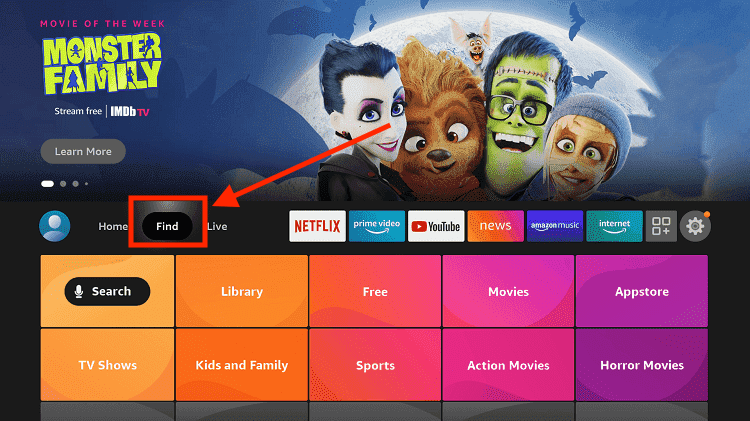
Step 4: Now select the Search option
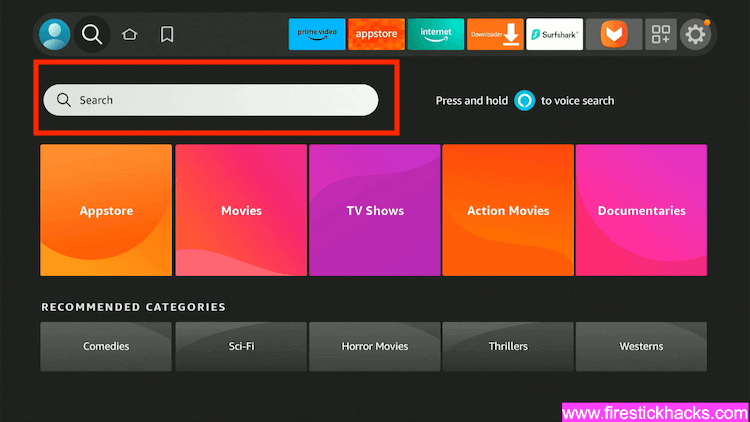
Step 5: Type Internet in the search bar and select from the list
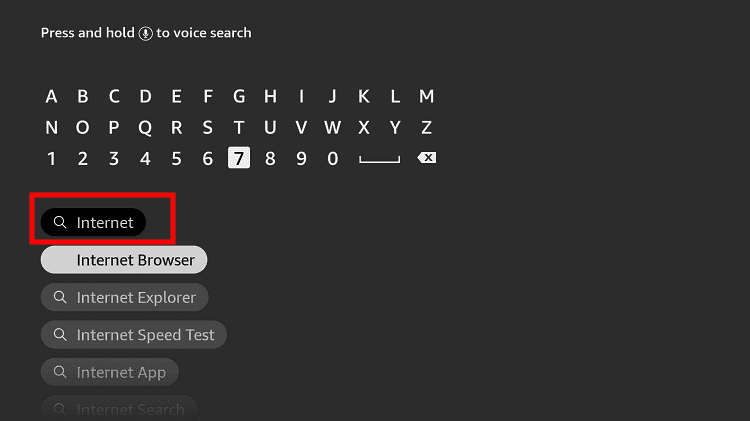
Step 6: Choose the Internet App (Silk Browser) from the given options
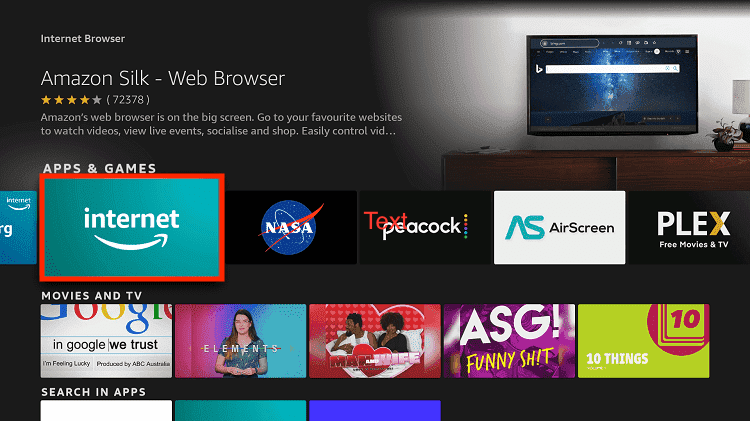
Step 7: Tap the Get/Download button
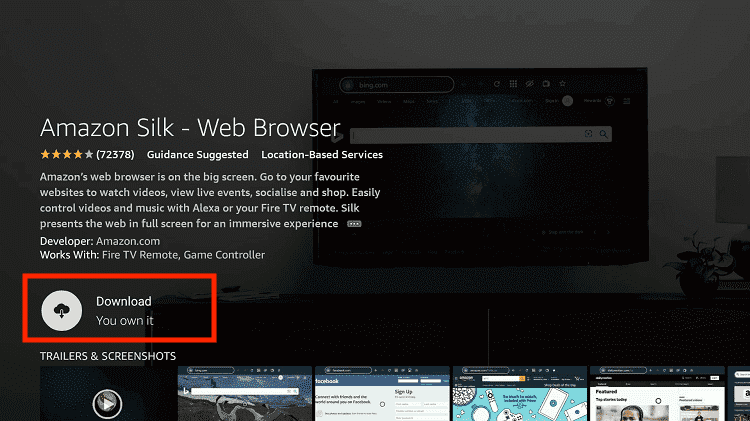
Step 8: Wait until the installation of the browser completes
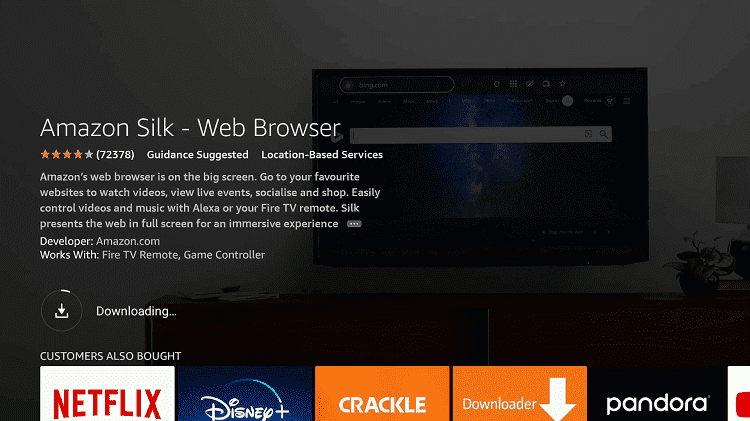
Step 9: Click Open, once the browser is installed.
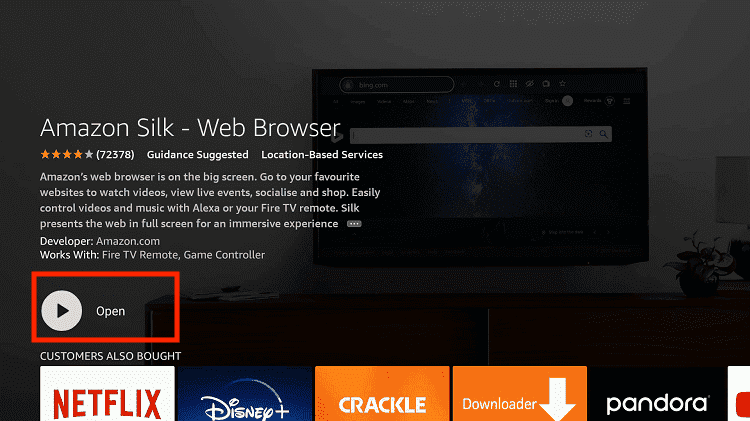
Step 10: Click on Accept Terms to access the browser
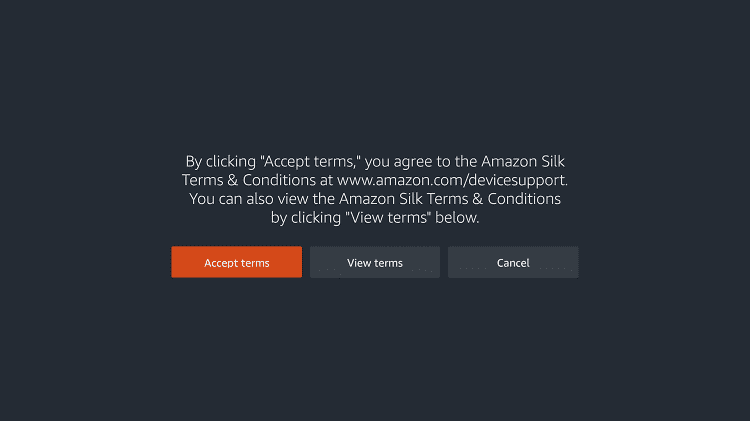
Step 11: When the browser launches, the Bing.com tab will open at first.
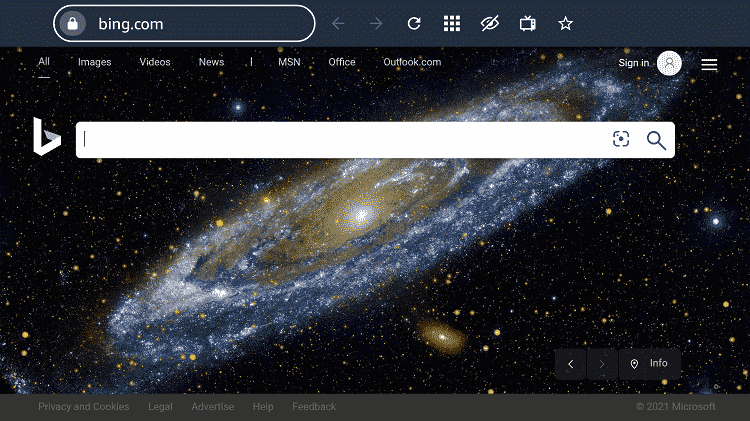
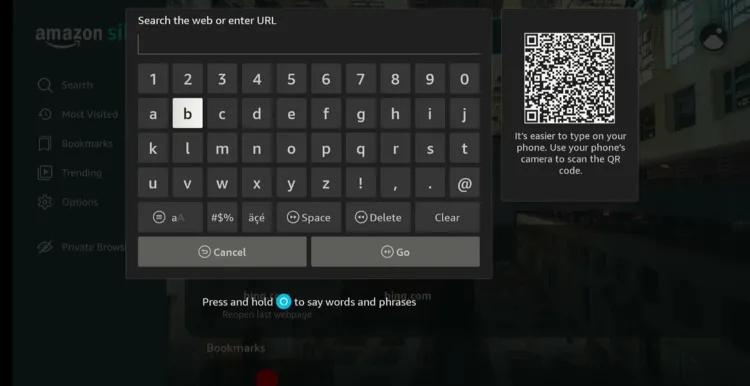
Step 12: Enter channel5.com/NFL in the search box and click “GO”.
Note: The referenced link is the official URL of this app/website. FIRESTICKHACKS does not own, operate, or re-sell any app, streaming site, or service and has no affiliation with its developers.
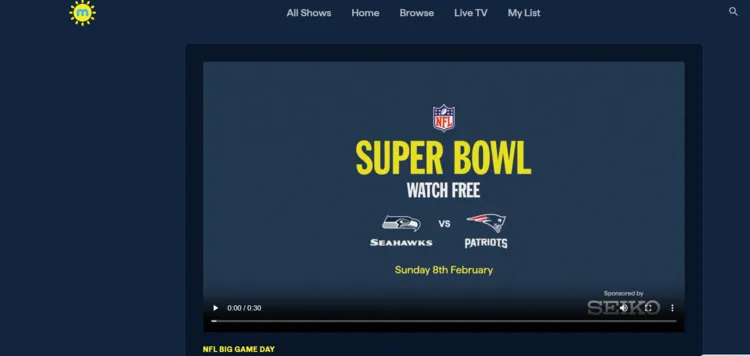
Step 13: The match will be available here as soon as it goes live. However, before streaming, you will be prompted to sign in to your account.
Paid Services/Channels to Watch Super Bowl LX on FireStick
If you want to stream the Super Bowl on FireStick using paid official services, you will have several options available.
However, most of these service apps/channels are region-locked, so you will have to install and use SurfShark VPN on FireStick to bypass any geo-restrictions.
- Sky Sports (UK, Ireland)
- YouTube TV, Sling TV, Peacock TV (US)
- DAZN (Canada)
- Kayo Sports (Australia)
When & Where is Super Bowl LX?
- Date: Sunday, February 8, 2026
- Kickoff Time: 6:30 PM Eastern Time (ET)
- Venue: Levi’s Stadium, Santa Clara, California
- Teams: Seattle Seahawks vs. New England Patriots
Seattle Seahawks Squad (Super Bowl LX)

| Player | Position |
|---|---|
| Sam Darnold | QB |
| Drew Lock | QB |
| Jalen Milroe | QB |
| Kenneth Walker III | RB |
| George Holani | RB |
| Robbie Ouzts | FB |
| Jaxon Smith-Njigba | WR |
| Cooper Kupp | WR |
| Rashid Shaheed | WR |
| Jake Bobo | WR |
| Dareke Young | WR |
| A.J. Barner | TE |
| Eric Saubert | TE |
| Nick Kallerup | TE |
| Charles Cross | T |
| Anthony Bradford | G |
| Grey Zabel | G |
| Jalen Sundell | C |
| Josh Jones | G/T |
| Christian Haynes | G |
| Olu Oluwatimi | C |
| Uchenna Nwosu | LB |
| Derick Hall | LB |
| Boye Mafe | LB |
| Ernest Jones IV | LB |
| Tyrice Knight | LB |
| Devon Witherspoon | CB |
| Riq Woolen | CB |
| Nehemiah Pritchett | CB |
| Julian Love | S |
| Coby Bryant | S |
| Ty Okada | S |
| Leonard Williams | DT |
| Jarran Reed | NT |
| Brandon Pili | NT |
| Rylie Mills | DE |
| Mike Morris | DE |
| Jason Myers | K |
| Michael Dickson | P |
| Chris Stoll | LS |
New England Patriots Squad (Super Bowl LX)

| Player | Position |
|---|---|
| Drake Maye | QB |
| Joshua Dobbs | QB |
| Tommy DeVito | QB |
| Rhamondre Stevenson | RB |
| TreVeyon Henderson | RB |
| Jack Westover | FB |
| Stefon Diggs | WR |
| Kayshon Boutte | WR |
| DeMario Douglas | WR |
| Mack Hollins | WR |
| Kyle Williams | WR |
| Hunter Henry | TE |
| Austin Hooper | TE |
| C.J. Dippre | TE |
| Will Campbell | OT |
| Vederian Lowe | OT |
| Ben Brown | C |
| Garrett Bradbury | C |
| Mike Onwenu | G |
| Morgan Moses | OT |
| Caedan Wallace | OT |
| K’Lavon Chaisson | LB |
| Anfernee Jennings | LB |
| Jack Gibbens | LB |
| Chad Muma | LB |
| Marvin Mapu | LB |
| Carlton Davis III | CB |
| Marcus Jones | CB |
| Christian Gonzalez | CB |
| Jaylinn Hawkins | S |
| Brenden Schooler | S |
| Dell Pettus | S |
| Christian Barmore | DT |
| Milton Williams | DT |
| Andy Borregales | K |
| Bryce Baringer | P |
| Julian Ashby | LS |
How to Watch Super Bowl LX Highlights
Super Bowl LX Halftime Show Lineup

The Super Bowl LX Halftime Show is one of the most talked‑about entertainment moments of the year as part of the big game on February 8, 2026, at Levi’s Stadium in Santa Clara, California.
🎤 Headliner
-
Bad Bunny — The Puerto Rican reggaeton and Latin trap superstar will headline the official Apple Music Super Bowl LX Halftime Show.
🎶 Pregame & National Anthems
- Charlie Puth — will perform the National Anthem.
- Brandi Carlile — will sing “America the Beautiful.”
- Coco Jones — will perform “Lift Every Voice and Sing.”
🎸 Opening Festivities
-
Green Day — The Bay Area rock legends are set to kick off Super Bowl day with a special performance celebrating the 60th anniversary of the event.
Super Bowl Winners by Year
Check out all the teams that have won Super Bowl since 1967:
| Year | Super Bowl Winner |
|---|---|
| 1967 | Green Bay Packers |
| 1968 | Green Bay Packers |
| 1969 | New York Jets |
| 1970 | Kansas City Chiefs |
| 1971 | Baltimore Colts |
| 1972 | Dallas Cowboys |
| 1973 | Miami Dolphins |
| 1974 | Miami Dolphins |
| 1975 | Pittsburgh Steelers |
| 1976 | Pittsburgh Steelers |
| 1977 | Oakland Raiders |
| 1978 | Dallas Cowboys |
| 1979 | Pittsburgh Steelers |
| 1980 | Pittsburgh Steelers |
| 1981 | Oakland Raiders |
| 1982 | San Francisco 49ers |
| 1983 | Washington Commanders |
| 1984 | Los Angeles Raiders |
| 1985 | San Francisco 49ers |
| 1986 | Chicago Bears |
| 1987 | New York Giants |
| 1988 | Washington Commanders |
| 1989 | San Francisco 49ers |
| 1990 | San Francisco 49ers |
| 1991 | New York Giants |
| 1992 | Washington Commanders |
| 1993 | Dallas Cowboys |
| 1994 | Dallas Cowboys |
| 1995 | San Francisco 49ers |
| 1996 | Dallas Cowboys |
| 1997 | Green Bay Packers |
| 1998 | Denver Broncos |
| 1999 | Denver Broncos |
| 2000 | St. Louis Rams |
| 2001 | Baltimore Ravens |
| 2002 | New England Patriots |
| 2003 | Tampa Bay Buccaneers |
| 2004 | New England Patriots |
| 2005 | New England Patriots |
| 2006 | Pittsburgh Steelers |
| 2007 | Indianapolis Colts |
| 2008 | New York Giants |
| 2009 | Pittsburgh Steelers |
| 2010 | New Orleans Saints |
| 2011 | Green Bay Packers |
| 2012 | New York Giants |
| 2013 | Baltimore Ravens |
| 2014 | Seattle Seahawks |
| 2015 | New England Patriots |
| 2016 | Denver Broncos |
| 2017 | New England Patriots |
| 2018 | Philadelphia Eagles |
| 2019 | New England Patriots |
| 2020 | Kansas City Chiefs |
| 2021 | Tampa Bay Buccaneers |
| 2022 | Los Angeles Rams |
| 2023 | Kansas City Chiefs |
| 2024 | Kansas City Chiefs |
| 2025 | Philadelphia Eagles |
| 2026 | Seattle Seahawks or New England Patriots (upcoming) |
Trouble Streaming Super Bowl on FireStick? Try These Fixes
If you’re dealing with buffering, app crashes, or other streaming glitches on FireStick, try these quick fixes to smooth things out:
- Clear app cache
- Close background apps
- Connect FireStick via Ethernet
- Set video resolution to 1080p/4K
- Restart FireStick
P.S. If you are still facing issues, check out our detailed articles to stop buffering on FireStick and fix playback errors.
Other Sports to Watch on FireStick [FREE]
Apart from Super Bowl LX, here is a list of a few other sports to watch on FireStick:
- NHL on FireStick
- NBA on FireStick
- UEFA Champions League on FIreStick
- Formula 1 on FireStick
- Premier League on FireStick