Disclosure: Our experts test apps for security before recommending them. If you buy through our links, we may earn a commission. See how it works.

The 2026-27 UEFA Champions League is already underway. The final play-off matches will be played on August 25 and 26, 2026.
The winners will join the 29 teams already qualified for the league phase. The main league phase begins on September 8, 2026.
RTÉ Player (Ireland) streams selected UCL matches for free, while LiveModeTV (Portugal) offers one free match per round through its official YouTube channel.
However, you can watch the entire UEFA Champions League season 2026-27 on FireStick for FREE via unofficial apps like SportzX, AK47 Sports, CricFy TV, or MaxLiv TV.
Please note that official services/channels mentioned in this blog are geo-restricted, and unofficial apps fetch content via unverified sources, so using a VPN is a must. Surfshark is our #1 choice.
🛡️ VPN RECOMMENDATION
Our Recommended VPN - Surfshark
Your ISP sees every stream. Unverified apps expose your IP. Fix both in under 2 minutes.
🔒 30-day money-back guarantee • $0.06/day

2 Ways to Watch Champions League on FireStick [2026-27]
The following are two tried-and-tested methods that will let you watch the UEFA Champions League on FireStick for FREE from anywhere in the world:
- Watch Champions League on FireStick Using Downloader App
- Watch Champions League on FireStick Using Amazon Silk Browser
How to Watch Champions League on FireStick Using Downloader App
Important: If/when SportzX is down or buffers, install AK47 Sports, MaxLiv, or CricFy TV to watch the Champions League.
SportzX is one of the best FireStick sports apps. It broadcasts several live sports for FREE, including the UEFA Champions League 2026-27.
However, since SportzX might be fetching links via unknown/unverified sources, make sure to install and use SurfShark VPN on FireStick to ensure secure streaming.
Follow the steps below:
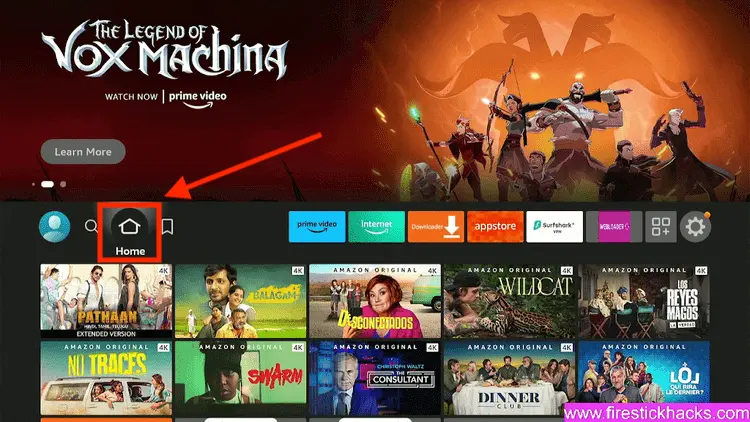
Step 1: Turn ON your FireStick device and Go to FireStick Home
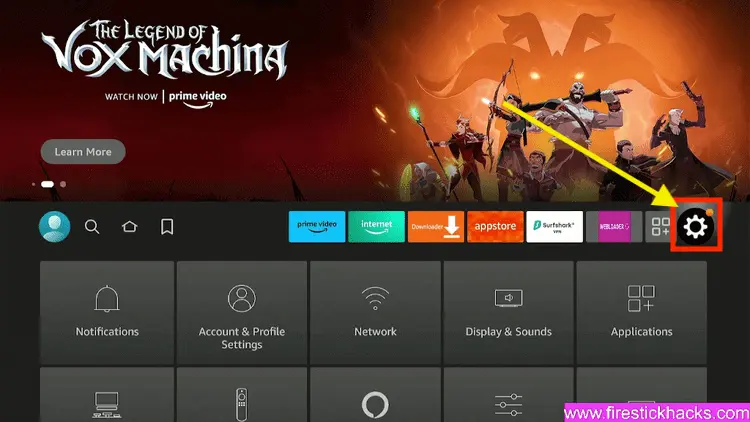
Step 2: Click on the Settings icon
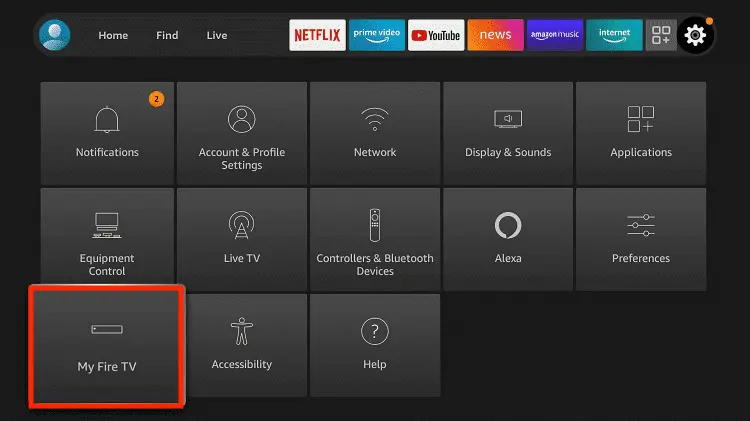
Step 3: Select the My Fire TV option
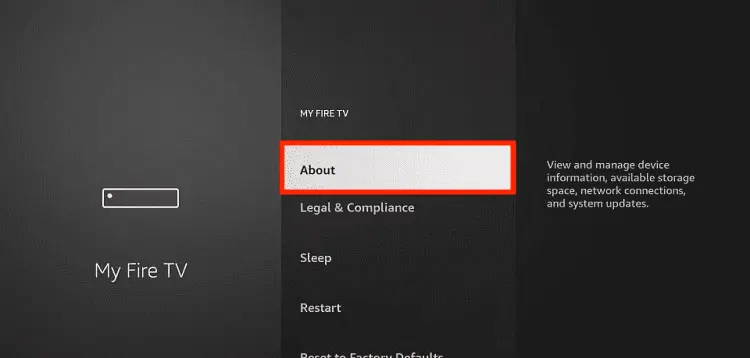
Step 4: To enable the Developer Option, click About.
Note: If you have already enabled the Developer Option, then proceed to Step 10
Step 5: Click on the Fire TV Stick option quickly at least 7 times
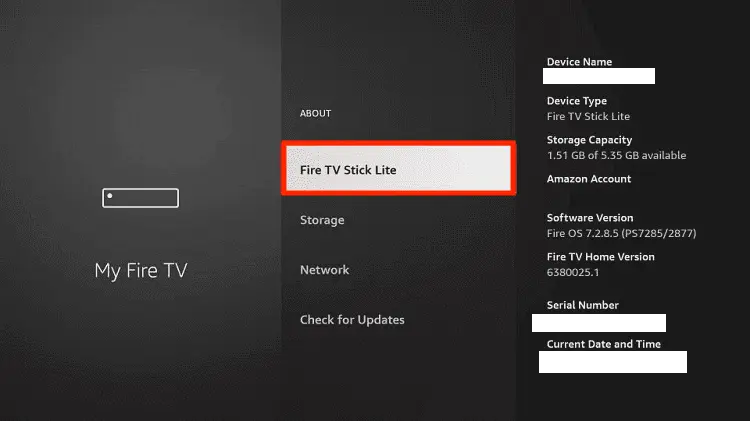
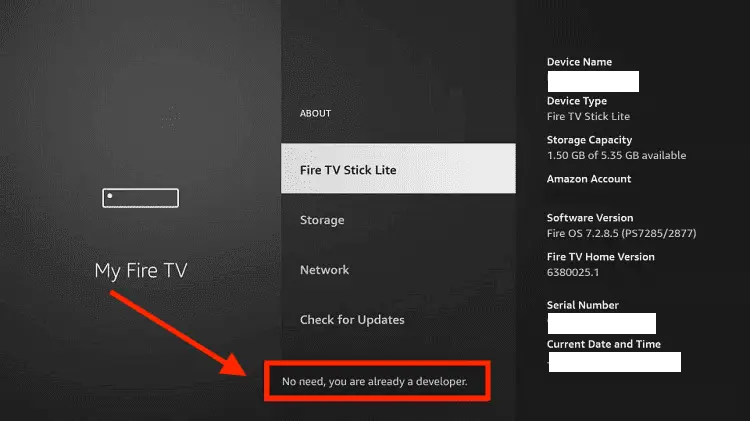
Step 6: Now you will see this message at the bottom saying "No need, you are already a developer". So stop clicking then
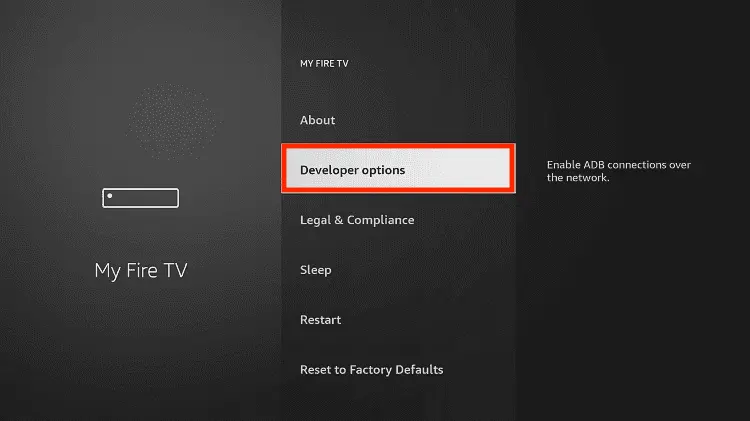
Step 7: Now the Developer Option will appear in the menu so click on it
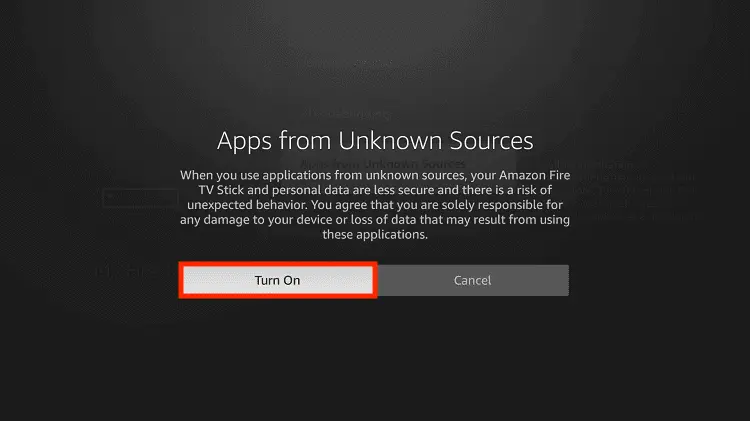
Step 8: Choose Apps from Unknown Sources to turn it ON
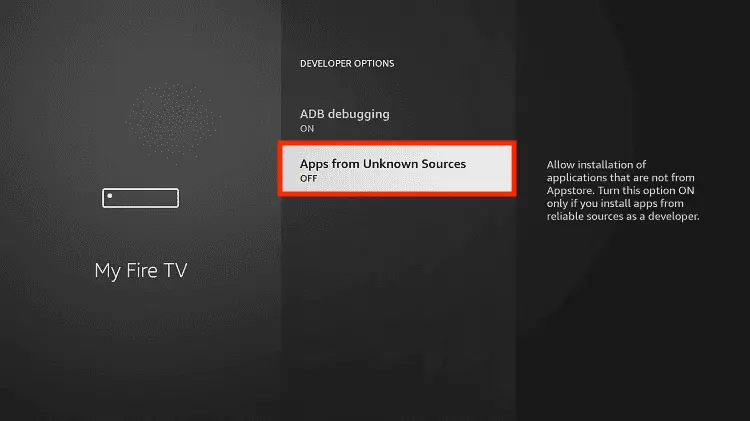
Step 9: Simply click Turn On
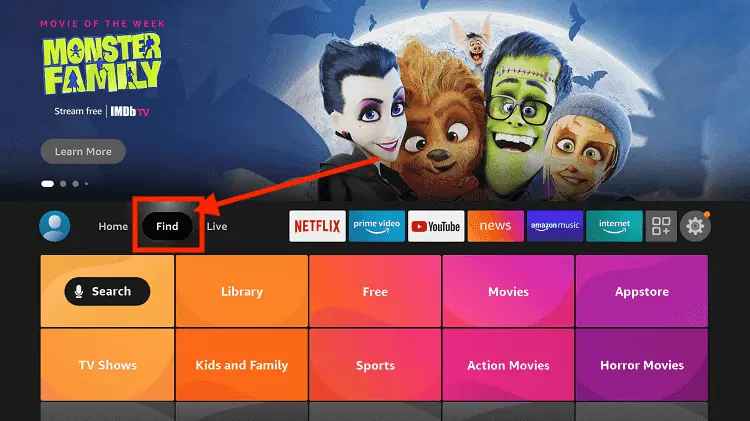
Step 10: Now return to the FireStick Home menu by pressing the "Home" icon on the remote and click on Find
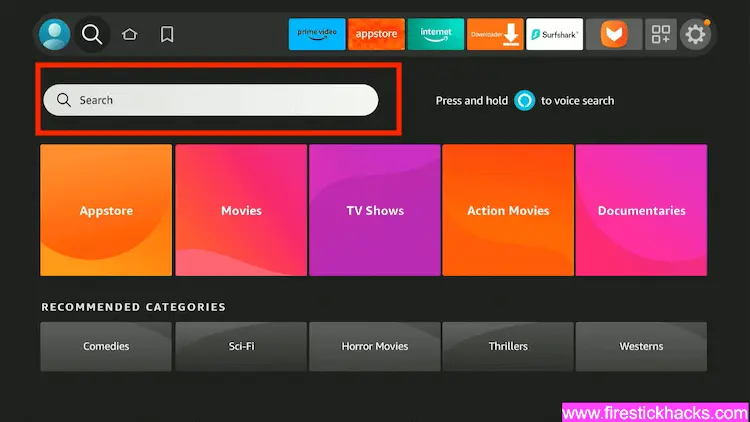
Step 11: Now select the Search icon
Step 12: Type Downloader and press search
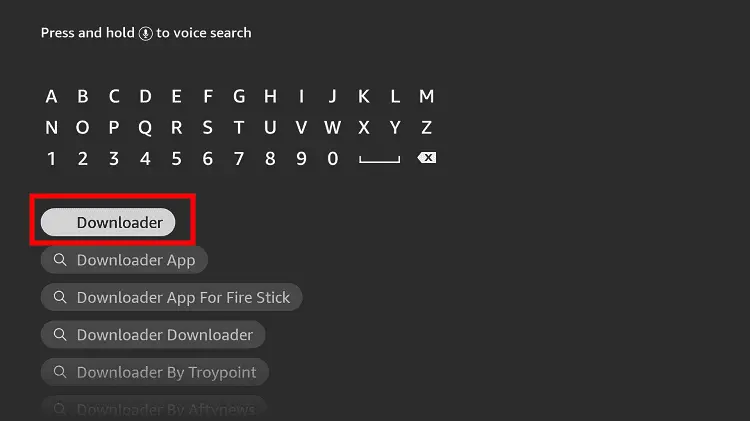
Step 13: Select the Downloader App icon from the list available in the Amazon Store
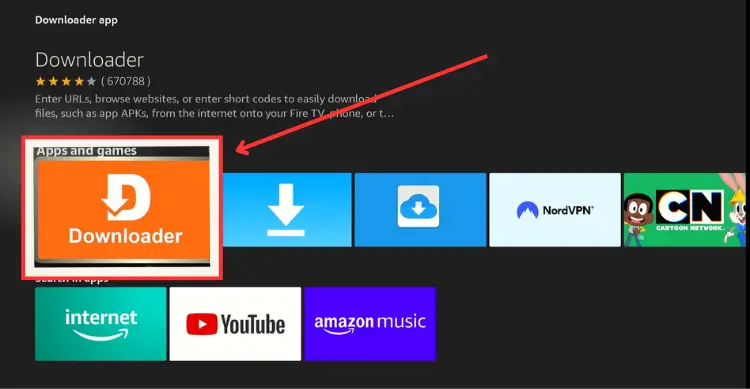
Step 14: Tap Get/Download
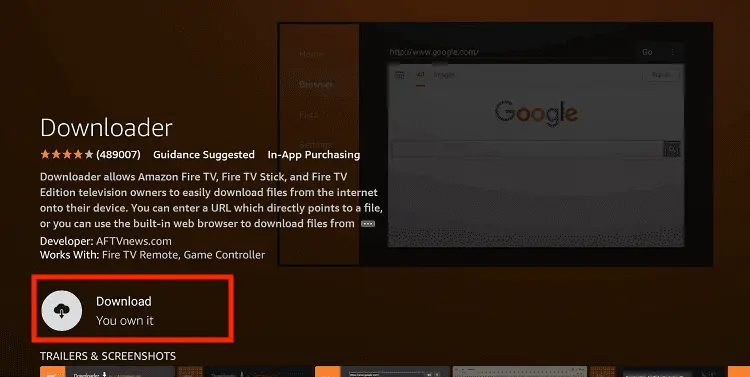
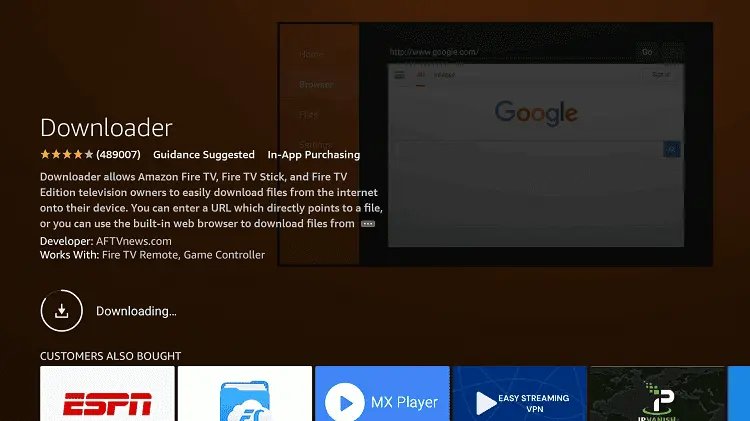
Step 15: Wait for a while until the installation process is completed
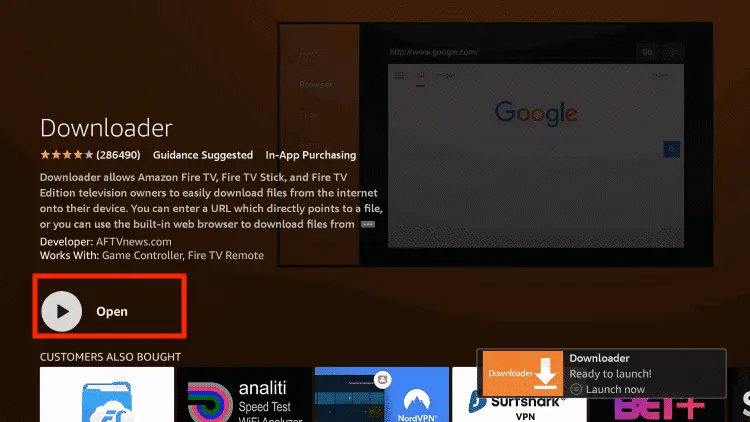
Step 16: Now click Open
Step 17: You will see a popup about Downloader app latest update. Click "OK".

Step 18: Click OK again

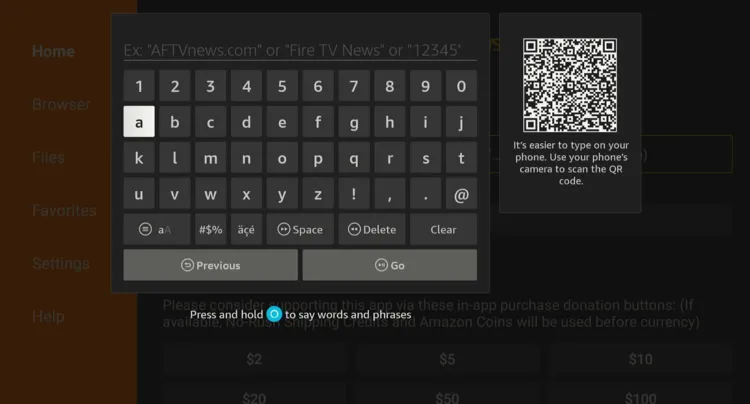
Step 19: This is the Downloader App interface, Click the Search Bar on top

Step 20: Now enter the SportzX Downloader Code 730116 in the search box OR enter this URL bit.ly/fsh-downloads and click Go.
Note: The referenced link is the official URL of this app/website. FIRESTICKHACKS does not own, operate, or re-sell any app, streaming site, or service and has no affiliation with its developers.
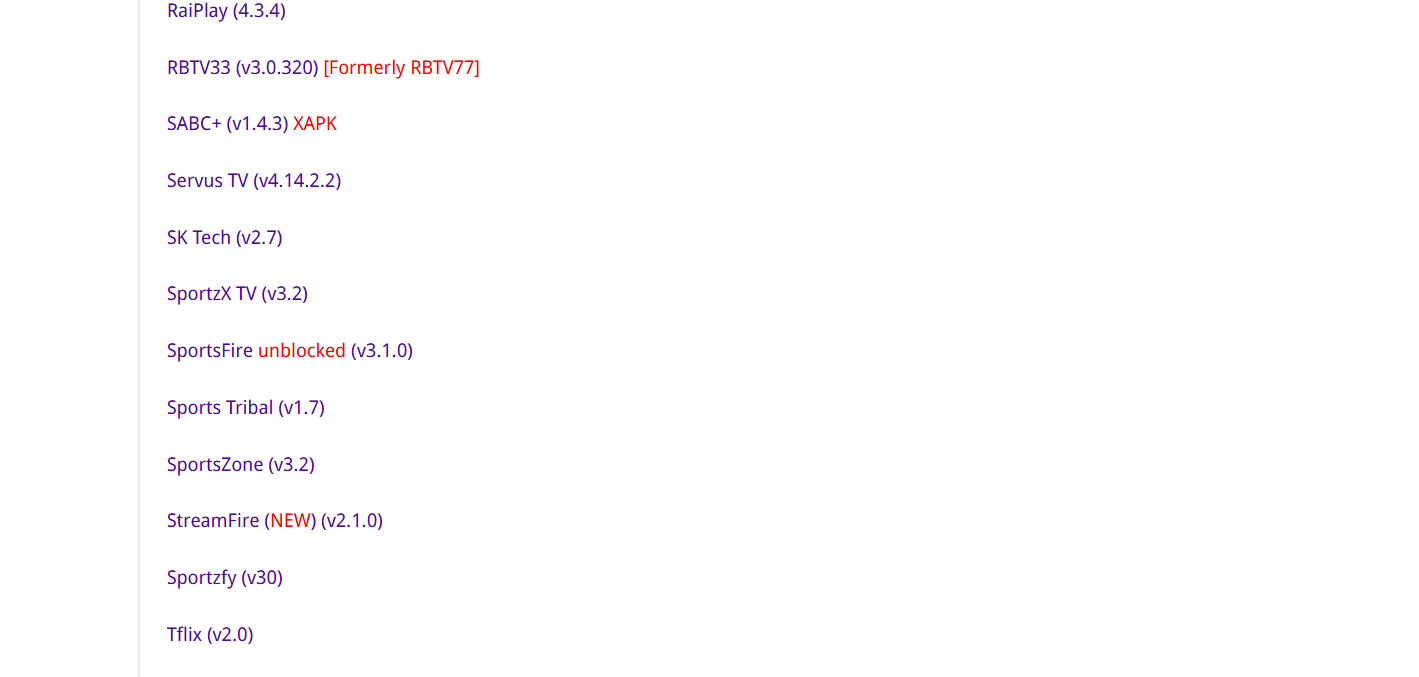
Step 21: Click “SportzX” from the “Sports Apps” category.
Note: If the app doesn’t start downloading, then clear the Downloader app cache using this article.
Step 22: The download will start. Wait for it to finish.

Step 23: Once the download ends, click “Install.”

Step 24: Select “Done.”

Step 25: Click “Delete.”
Note: Deleting SportzX is necessary to free up space on your FireStick.

Step 26: Select “Delete” again to confirm your action.

Step 27: Now open Surfshark on your FireStick device and connect it to the Hong Kong server.

Step 28: Choose “Apps Library” from the top right corner (Next to the “Settings” icon).
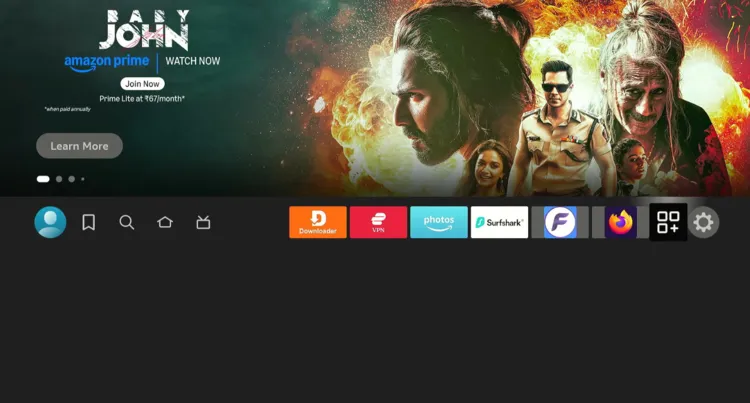
Step 29: Choose the “SportzX” app from the list.

Step 30: You will see the UEFA Champions League matches on the home screen. Select the match.

Step 31: Enjoy streaming!

How to Watch Champions League on FireStick Using Browser
You can also watch the UCL season 2026-27 on FireStick by installing a FireStick Browser and using free sports streaming websites.
However, make sure to install and use SurfShark VPN on FireStick because free websites do not broadcast officially and require a VPN to hide your online activity.
Note: Sometimes, streaming via unofficial websites means dealing with annoying pop-ups. In that case, you can install Brave Browser on FireStick to ensure an ad-free experience.
Follow the steps below:
Step 1: Open Surfshark on your FireStick device and connect it to the Hong Kong server.

Step 2: Go to FireStick Home
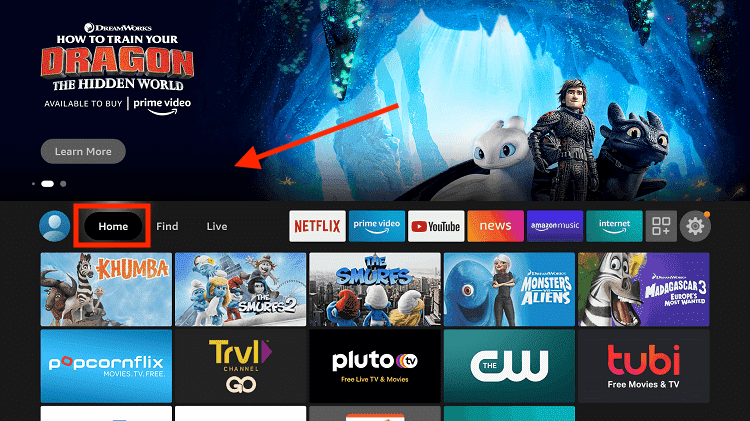
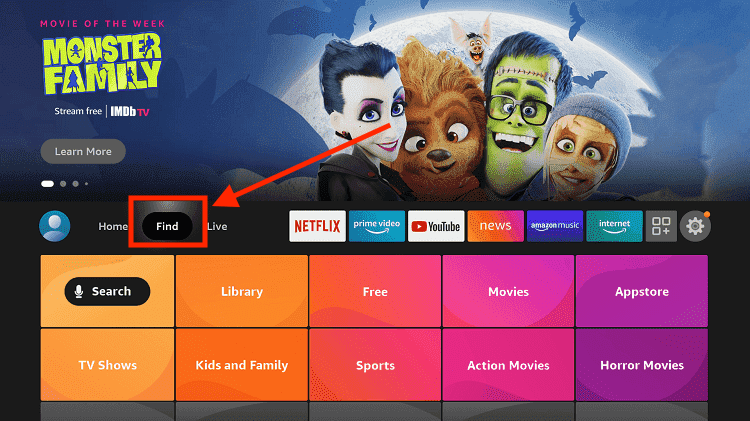
Step 3: Click on the Find tab
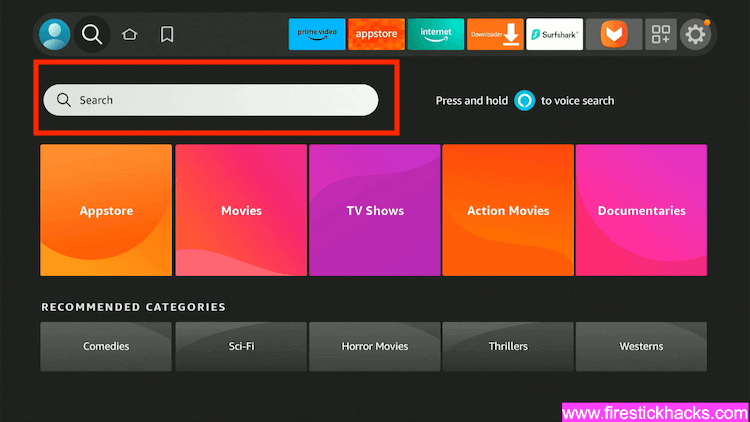
Step 4: Now select the Search option
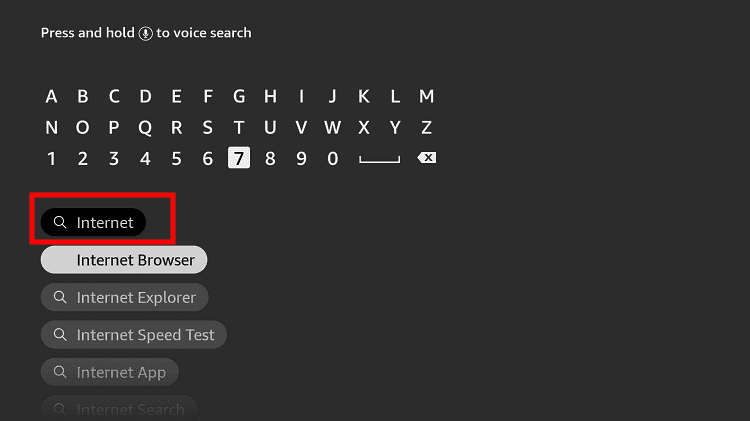
Step 5: Type Internet in the search bar and select from the list
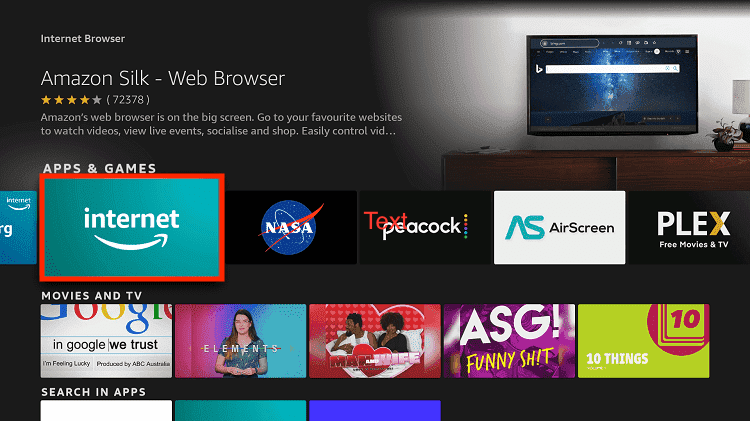
Step 6: Choose the Internet App (Silk Browser) from the given options
Step 7: Tap the Get/Download button
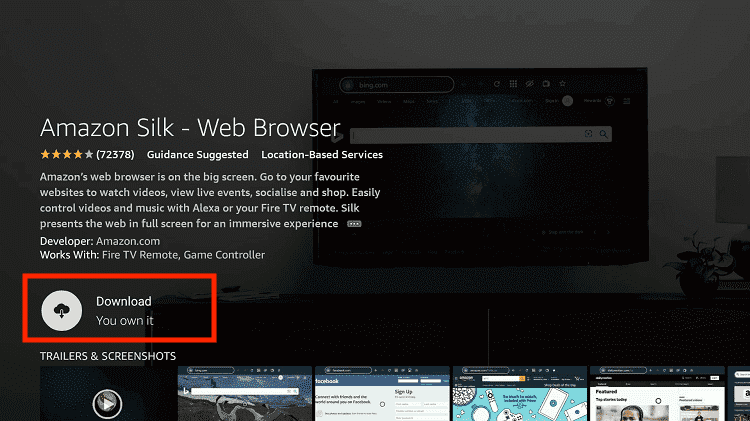
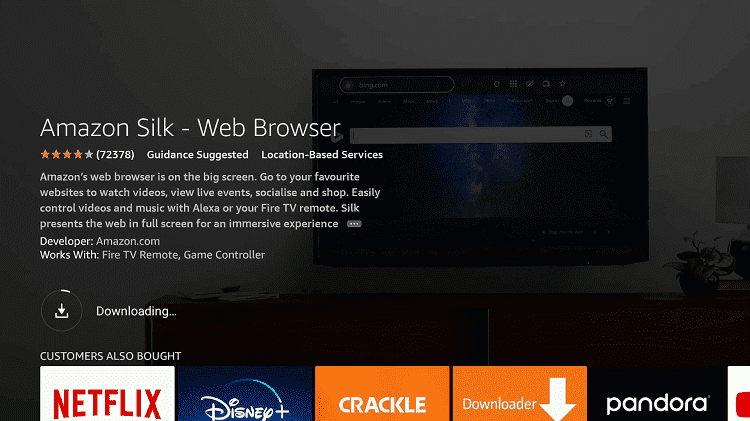
Step 8: Wait until the installation of the browser completes
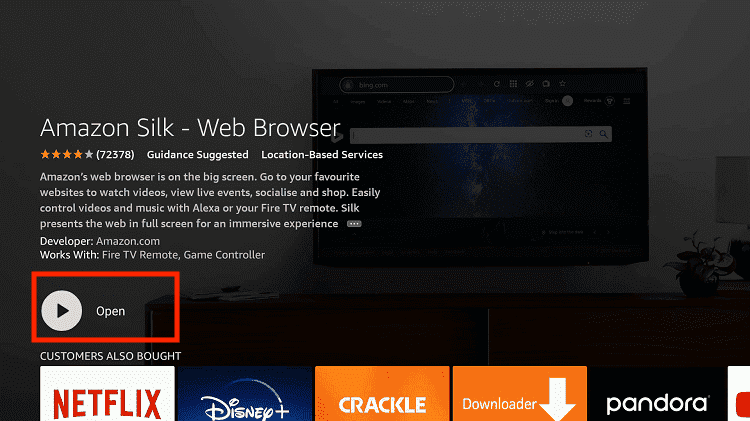
Step 9: Click Open, once the browser is installed.
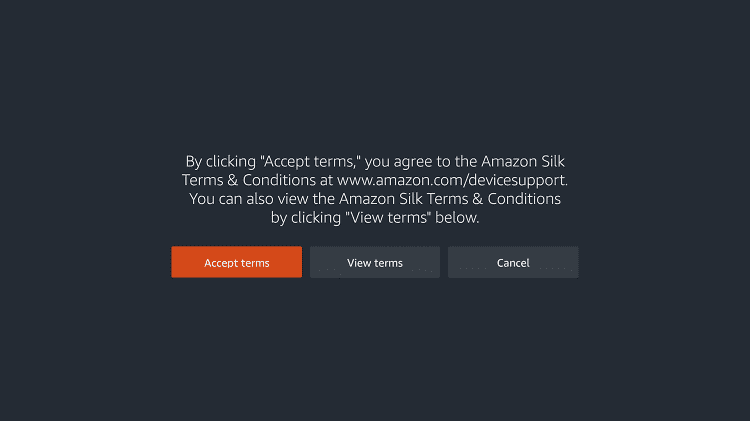
Step 10: Click on Accept Terms to access the browser
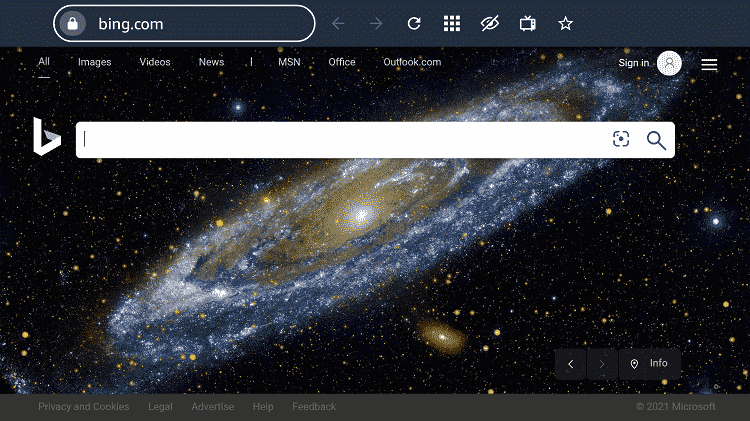
Step 11: When the browser launches, the Bing.com tab will open at first.
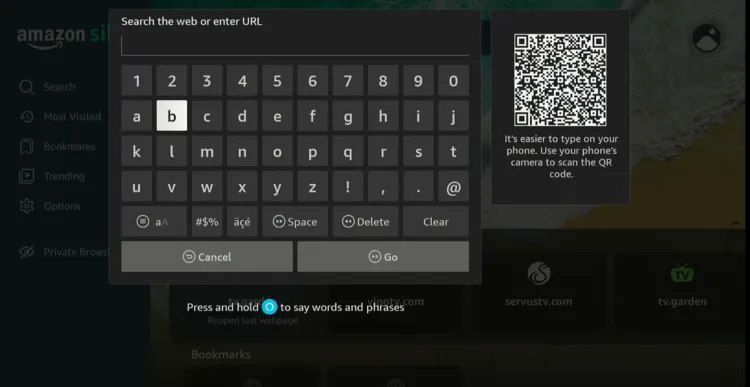
Step 12: Type Sportsbay.dk OR strikeout.im OR viprow.nu in the search box and click “GO”.
Step 13: Choose “Soccer.”

Step 14: Tap “Stay Here.”
P.S. Every time you see this pop-up, click “Stay Here”.

Step 15: Choose the match you want to see and then click on the streaming link.

Step 16: Tap the play button.
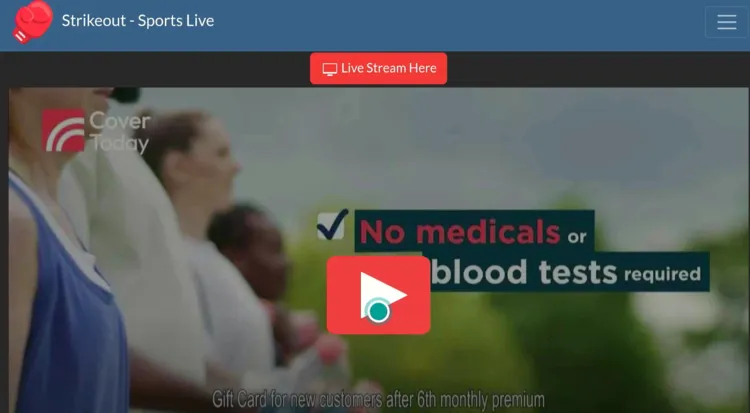
Step 17: Enjoy streaming!

How to Watch UEFA Champions League Highlights
You can watch the UCL highlights via the official YouTube channels of different broadcasters like TNT Sports Football and BBC Football.
The biggest issue with YouTube is the ads. You can avoid YouTube ads with TizenTube and SmartTube.
Official Channels/Services to Watch Champions League on FireStick
Here are some of the best official channels/services to watch UEFA Champions League 2026/27 on your FireStick:
✅ LiveModeTV (Portugal) – One Match Per Round for Free
✅ RTÉ Player (Ireland) – Selected Matches for Free
✅ Paramount Plus (US)
✅ TNT Sports (UK, Ireland)
✅ DAZN (Canada)
✅ Hulu (US)
✅ SuperSport (South Africa)
✅ FuboTV (US)
✅ Canal+ (France)
Champions League 2026-27 Schedule [Upcoming Matches]
| Stage / Match | Date & Time (ET) |
|---|---|
| Play-off — Sabah vs. Hapoel Beer-Sheva | Aug. 25, 12:45 PM |
| Play-off — LASK vs. Celtic | Aug. 25, 3:00 PM |
| Play-off — Bodø/Glimt vs. N.E.C. | Aug. 25, 3:00 PM |
| Play-off — AEK Athens vs. Levski Sofia | Aug. 26, 3:00 PM |
| Play-off — Viking vs. GNK Dinamo | Aug. 26, 3:00 PM |
| Play-off — Celje vs. Slovan Bratislava | Aug. 26, 3:00 PM |
| Play-off — Lyon vs. Fenerbahçe | Aug. 26, 3:00 PM |
Champions League 2026-27 Complete Schedule Breakdown
| Stage / Matchday | Date |
|---|---|
| First Qualifying Round | July 7 & 14, 2026 |
| Second Qualifying Round | July 21 & 28, 2026 |
| Third Qualifying Round | August 4 & 11, 2026 |
| Play-off Round | August 18–19 & 25–26, 2026 |
| League Phase Draw | August 27, 2026 |
| Matchday 1 | September 8–10, 2026 |
| Matchday 2 | September 29–30, 2026 |
| Matchday 3 | October 20–21, 2026 |
| Matchday 4 | November 3–4, 2026 |
| Matchday 5 | November 24–25, 2026 |
| Matchday 6 | December 8–9, 2026 |
| Matchday 7 | January 19–20, 2027 |
| Matchday 8 | January 28, 2027 |
| Knockout Phase Play-offs | February 16–18 & 23–25, 2027 |
| Round of 16 | March 9–10 & 16–17, 2027 |
| Quarter-finals | April 6–7 & 13–14, 2027 |
| Semi-finals | April 27–28 & May 4–5, 2027 |
| Final | June 5, 2027 |
Trouble Streaming Champions League on FireStick? Try These Fixes
If you’re dealing with buffering, app crashes, or other streaming glitches on FireStick, try these quick fixes to smooth things out:
- Clear app cache
- Close background apps
- Connect FireStick via Ethernet
- Set video resolution to 1080p/4K
- Install Brave Browser for fewer ads
- Restart FireStick
Other Football Leagues to Watch on FireStick [FREE]
Besides the UEFA Champions League, the following are some other football leagues that you can watch on your FireStick device.
- Premier League on FireStick
- Bundesliga on FireStick
- La Liga on FireStick
- France Ligue 1 on FireStick
- Serie A on FireStick
FAQs – Champions League
That said, official services are geo-restricted, and unofficial apps use unverified sources, so it’s essential to use Surfshark to protect your connection or unlock region-locked content.