Disclosure: Our experts test apps for security before recommending them. If you buy through our links, we may earn a commission. See how it works.

FireStick doesn’t have many good browsers. Even Amazon’s Silk Browser feels clunky for many users. TV Bro fills that gap by working smoothly with FireStick remote.
It is a free, open-source browser that blocks ads, supports incognito mode, and allows bookmarking. You can even install APK files on FireStick with TV Bro.
However, since you will have to install TV Bro from a third-party source, be sure to use a VPN to add an additional layer of security to your device. Surfshark is our #1 choice.
How to Install TV Bro on FireStick Using Downloader App
TV Bro isn’t listed on the Amazon Appstore. But the good news is that you can sideload it using the Downloader app.
Before starting the jailbreaking/sideloading process, don’t forget to install and use SurfShark VPN on FireStick to enhance your online security.
Follow the steps below:
Step 1: Turn ON your FireStick device and Go to FireStick Home

Step 2: Click on the Settings icon
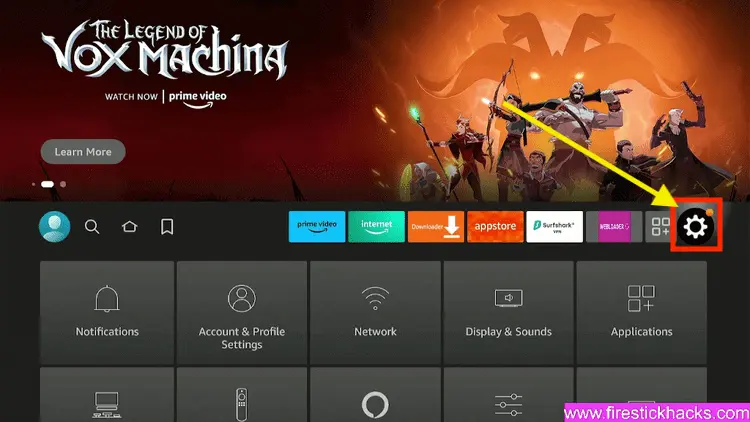
Step 3: Select the My Fire TV option

Step 4: To enable the Developer Option, click About.
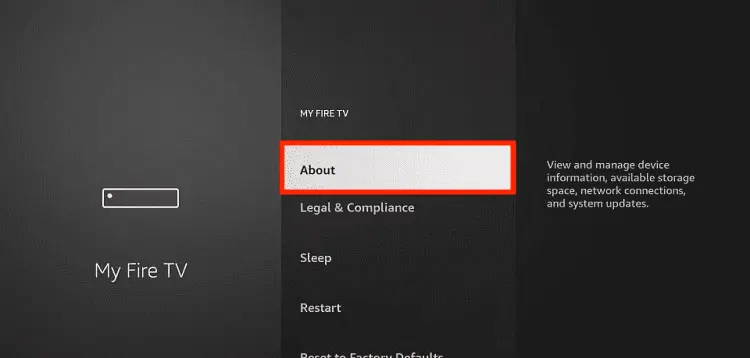
Note: If you have already enabled the Developer Option, then proceed to Step 10
Step 5: Click on the Fire TV Stick option quickly at least 7 times

Step 6: Now you will see this message at the bottom saying "No need, you are already a developer". So stop clicking then

Step 7: Now the Developer Option will appear in the menu so click on it
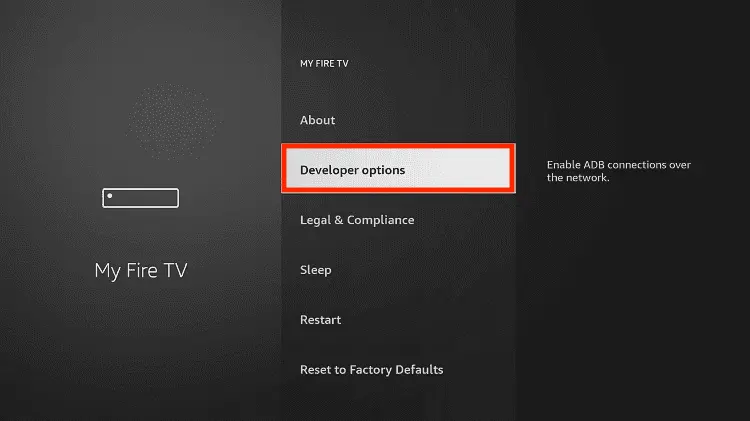
Step 8: Choose Apps from Unknown Sources to turn it ON

Step 9: Simply click Turn On

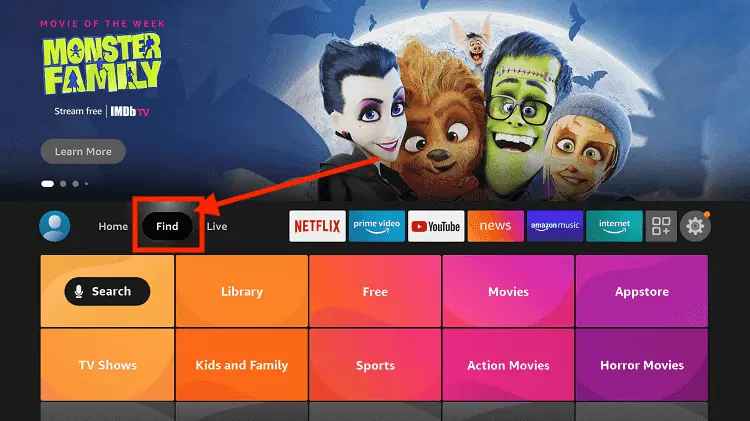
Step 10: Now return to the FireStick Home menu by pressing the "Home" icon on the remote and click on Find
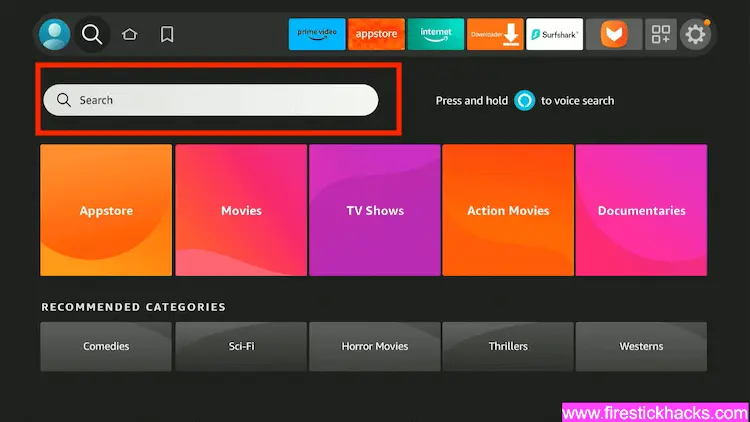
Step 11: Now select the Search icon
Step 12: Type Downloader and press search
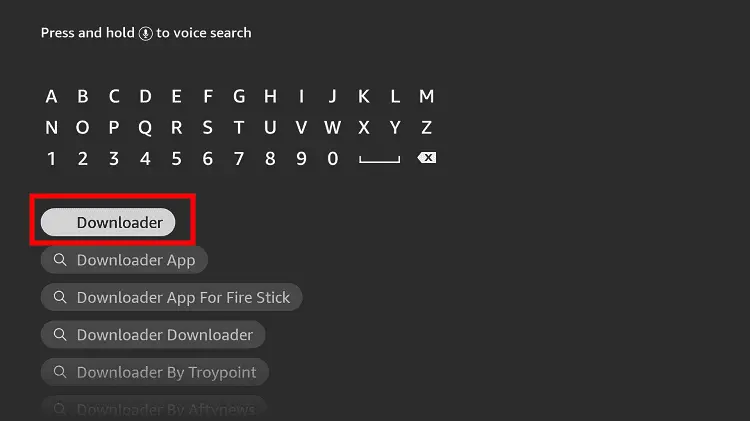
Step 13: Select the Downloader App icon from the list available in the Amazon Store

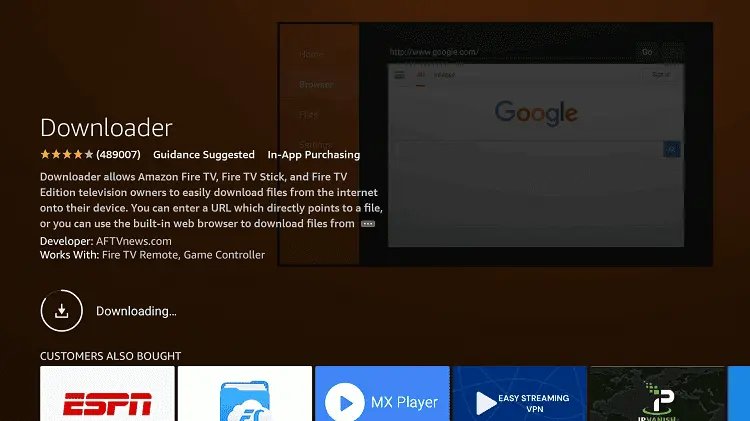
Step 14: Tap Get/Download
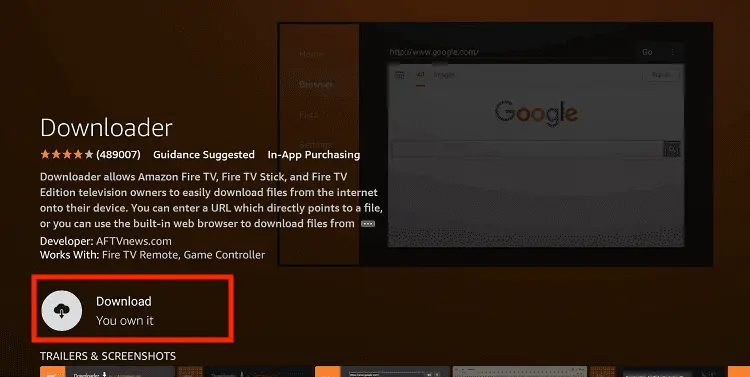
Step 15: Wait for a while until the installation process is completed
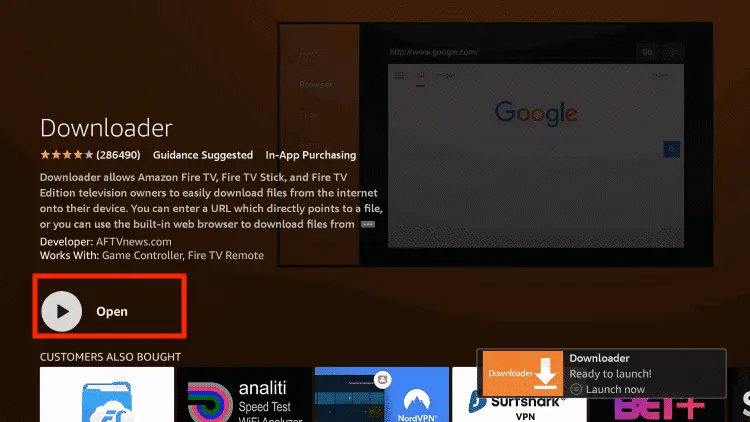
Step 16: Now click Open
Step 17: You will see a popup about Downloader app latest update. Click "OK".

Step 18: Click OK again

Step 19: This is the Downloader App interface, Click the Search Bar on top

Step 20: Enter TV Bro Downloader Code 730116 in the search box OR enter this URL bit.ly/fsh-downloads and click Go.
Note: The referenced link is the official URL of this app/website. FIRESTICKHACKS does not own, operate, or re-sell any app, streaming site, or service and has no affiliation with its developers.

Step 21: Scroll down and click “TV Bro ” from the “Utility Apps” category.
Note: If the app does not start downloading, then clear the Downloader App cache using this article.

Step 22: The downloading will start. Wait for it to finish.

Step 23: Once the downloading ends, click “Install”.

Step 24: Tap the “Done” icon.

Step 25: Click “Delete” to remove the Brave Browser APK file from FireStick.
Note: Deleting APK files will free up space on FireStick.

Step 26: Tap “Delete” again to complete the process.

How to Use TV Bro on FireStick
The good thing about TV Bro is that it is fully compatible with FireStick remote. So once you are done with the installation process, you can start using TV Bro immediately.
Follow the steps below:
Step 1: Launch the “TV Bro” app.

Step 2: This is the homescreen. Now, type any query, text, or website.

Step 3: There you go, the results will show up.

Step 4: If you want to open a “New Tab”, click the plus icon in the top-right corner. To close the tab, “long-press” the plus icon.

Step 5: You can switch to “Incognito Mode” by clicking on this icon.

Step 6: To turn off ads, click on the “Ads” icon from the bottom menu.

Step 7: For more customization, click on the “Settings” icon.

Step 8: In “Settings”, you will see these features. You may explore them according to your preferences.

Is TV Bro Browser Safe/Legal to Use on FireStick?

TV Bro latest APK (v2.0.1) is completely safe to use. We scanned its APK file on VirusTotal and found no malware or viruses (see the picture above to verify our claim).
However, since this app isn’t available on the Amazon Appstore, don’t forget to install and use SurfShark VPN on FireStick when sideloading it on your FireStick device.
All You Need to Know About TV Bro APK
Here is a quick sneak peek into TV Bro:
| App Type | Browser |
| Price | Free |
| File Size | 125.8 MB |
| Version | 2.0.1 |
| Is It Safe to Install and Use? | Yes, but with a VPN |
Top TV Bro Features

✅ Remote-friendly navigation
✅ Free app
✅ Built-in download manager
✅ Tabs, bookmarks & history
✅ Ad-blocking
✅ Fast page loading
✅ Video playback support (for web streams)
✅ Customize homescreen
Trouble Using TV Bro Browser? Try These Fixes
If you’re dealing with app crashes or other glitches with TV Bro, try these quick fixes to smooth things out:
- Restart the internet router
- Clear app cache
- Close background apps
- Restart FireStick
TV Bro Alternatives
Apart from TV Bro, you can also try out some of its following alternatives on FireStick:
- Puffin TV Browser on FireStick
- Amazon Silk Browser on FireStick
- Brave Browser on FireStick
- Chrome Browser on FireStick
TV Bro – FAQs
What is TV Bro Browser?
TV Bro is a free, open-source web browser designed specifically for FireStick and Android TV devices.
Is TV Bro available on the Amazon Appstore?
No, TV Bro is not listed on the Amazon Appstore; you will have to sideload it using the Downloader app.
Does TV Bro support ad-blocking?
Yes, it includes a built-in option to block ads while browsing.
Can I install APK files using TV Bro?
Yes, TV Bro allows you to download and install APK files directly on FireStick.
Does TV Bro work with FireStick remote?
Yes, it is fully optimized for FireStick remote navigation.
Does TV Bro have incognito mode?
Yes, it offers incognito mode for private browsing.
Conclusion
Despite being new, TV Bro has become one of the best browsers on FireStick. It removes many of the common frustrations users face with traditional TV browsers.
For example, it offers smoother navigation, built-in ad-blocking, and handy features like incognito mode and bookmarks. On top of that, it also lets you install APK files directly on FireStick.
That said, since this requires sideloading on FireStick, it’s important to take the usual precautions like installing a Surfshark VPN.