Disclosure: Our experts test apps for security before recommending them. If you buy through our links, we may earn a commission. See how it works.

Since its debut in 2010, The Great British Bake Off (GBBO) has run for 16 successful seasons. The series 16 crowned Jasmine Mitchell as the winner on November 4, 2025.
The latest season of the Great British Bake Off featured Paul Hollywood and Prue Leith as the judges, both of whom have become familiar faces over the years.
You can watch series 8 to 16 for free on Channel 4 (UK). However, OnStream lets you watch all 16 series of the Great British Bake Off show for free.
Please note that Channel 4 is restricted to the UK, and OnStream fetches links from unknown sources. Therefore, you must use a VPN like Surfshark to watch the show outside the UK and enjoy secure streaming.
🛡️ VPN RECOMMENDATION
Our Recommended VPN - Surfshark
Your ISP sees every stream. Unverified apps expose your IP. Fix both in under 2 minutes.
🔒 30-day money-back guarantee • $0.06/day

2 Ways to Watch the Great British Bake Off on FireStick
The following 2 tried-and-tested methods will let you watch the Great British Bake Off on FireStick for free from anywhere in the world:
- Watch the Great British Bake Off on FireStick Using Downloader App
- Watch the Great British Bake Off on FireStick by Using a Browser
How to Watch the Great British Bake Off on FireStick Using Downloader App
OnStream is one of the best free movie apps on FireStick. It features over 18,000 films and TV shows, including all 16 series of the Great British Bake Off.
Though OnStream asks for a sign-in, it is not mandatory. So as soon as you install the app, you are all set to start your entertainment journey without any ads.
However, since the app scrapes links from unverified/unknown sources, you should install and use SurfShark VPN on FireStick to ensure secure browsing.
Follow the steps below:
Step 1: Turn ON your FireStick device and Go to FireStick Home

Step 2: Click on the Settings icon
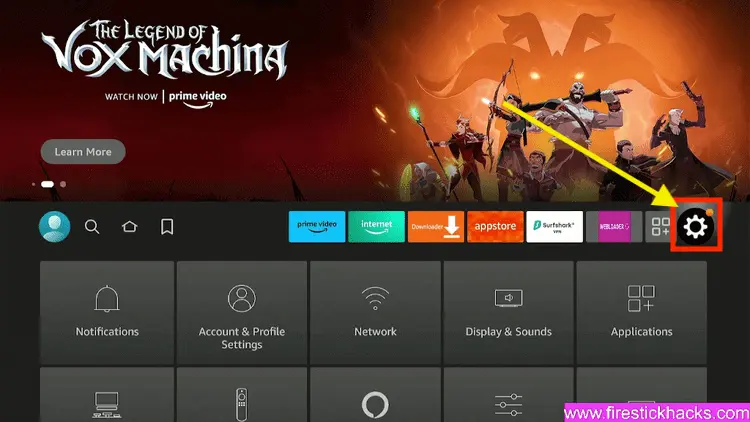
Step 3: Select the My Fire TV option

Step 4: To enable the Developer Option, click About.
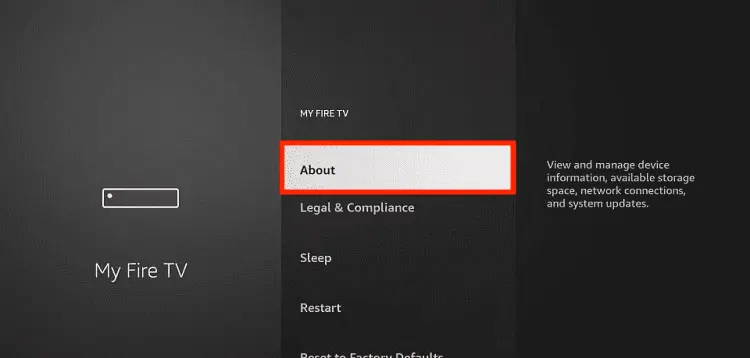
Note: If you have already enabled the Developer Option, then proceed to Step 10
Step 5: Click on the Fire TV Stick option quickly at least 7 times

Step 6: Now you will see this message at the bottom saying "No need, you are already a developer". So stop clicking then

Step 7: Now the Developer Option will appear in the menu so click on it
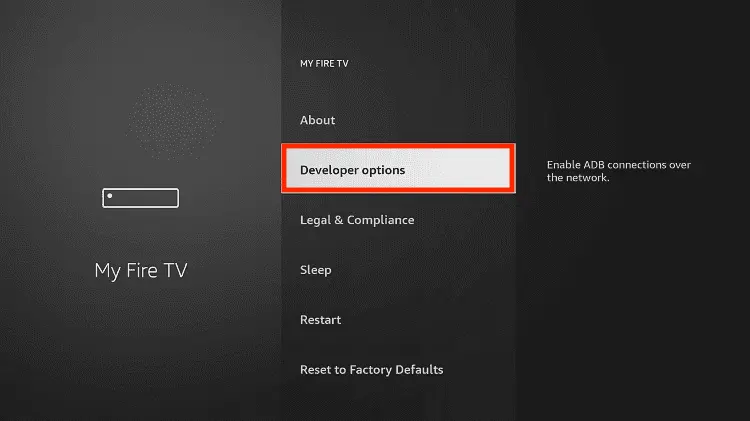
Step 8: Choose Apps from Unknown Sources to turn it ON

Step 9: Simply click Turn On

Step 10: Now return to the FireStick Home menu by pressing the "Home" icon on the remote and click on Find
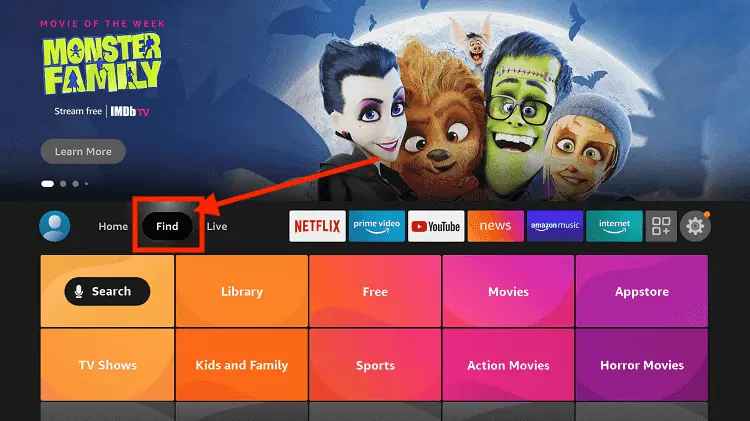
Step 11: Now select the Search icon
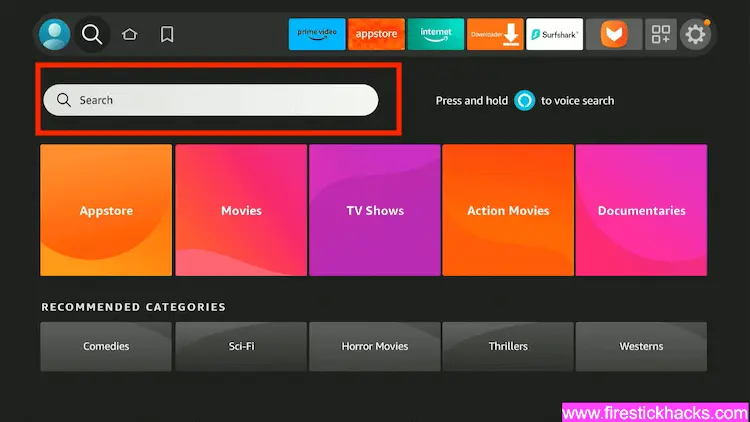
Step 12: Type Downloader and press search
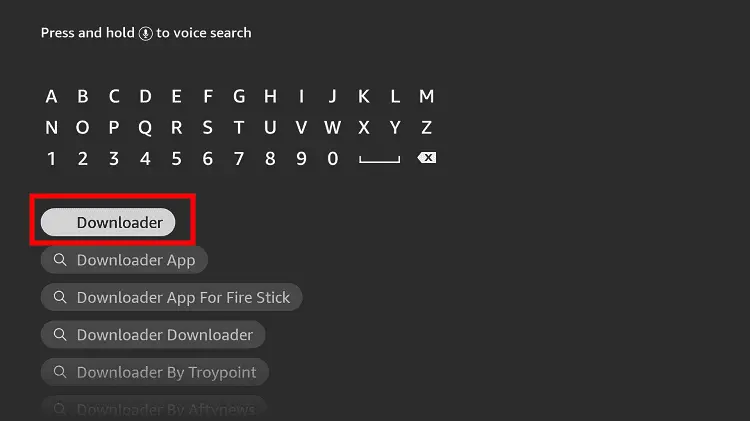
Step 13: Select the Downloader App icon from the list available in the Amazon Store

Step 14: Tap Get/Download
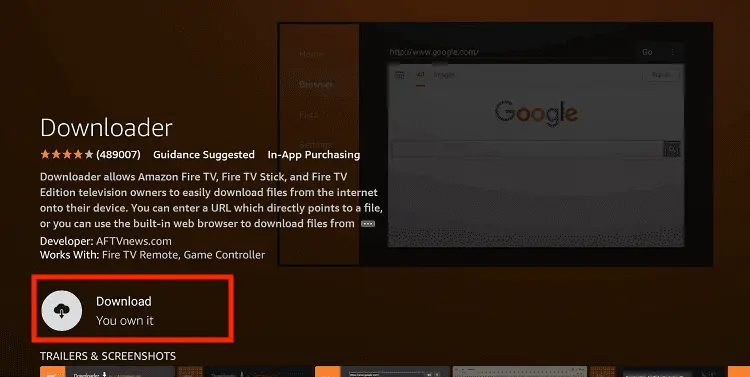
Step 15: Wait for a while until the installation process is completed
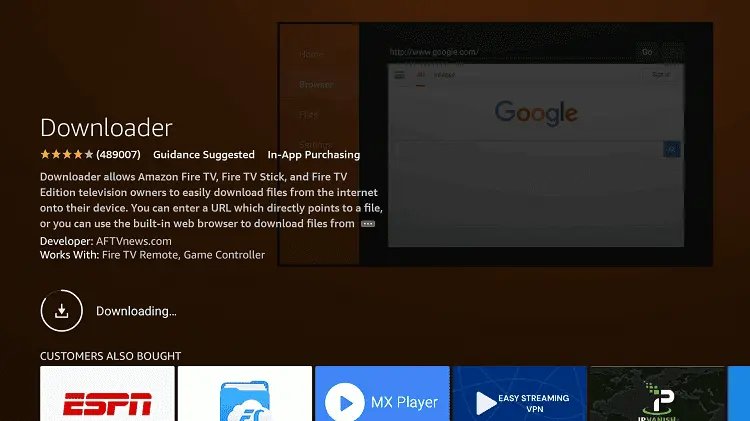
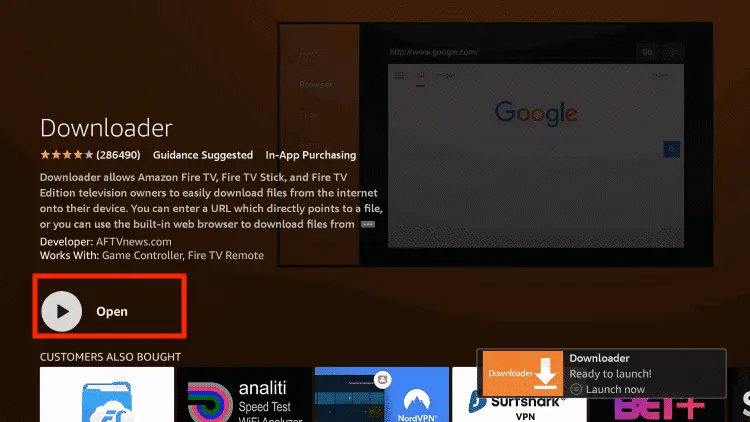
Step 16: Now click Open
Step 17: You will see a popup about Downloader app latest update. Click "OK".

Step 18: Click OK again

Step 19: This is the Downloader App interface, Click the Search Bar on top

Step 20: Enter the OnStream Downloader Code 730116 in the search box OR enter this URL bit.ly/fsh-downloads and click Go.
Note: The referenced link is the official URL of this app/website. FIRESTICKHACKS does not own, operate, or re-sell any app, streaming site, or service and has no affiliation with its developers.

Step 21: Scroll down and click “OnStream” from the “Movies & TV Shows Apps” category.
Note: If the app does not start downloading, then clear the Downloader App cache using this article.
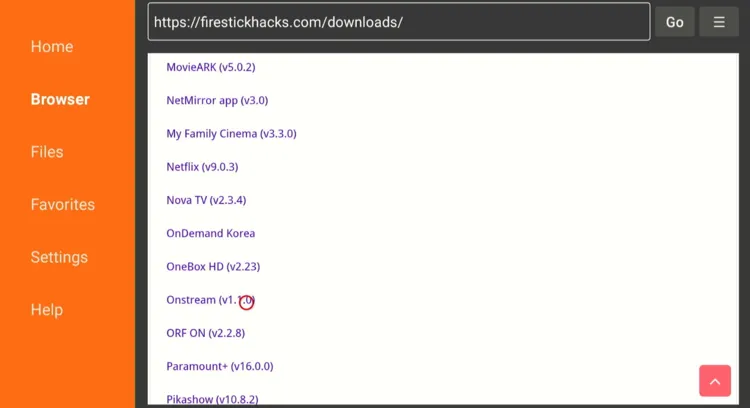
Step 22: The download will start automatically. Wait for it to finish.

Step 23: Once the download ends, choose “Install”.

Step 24: Click “Done”.

Step 25: Select “Delete”.
Note: Deleting APK files will free up space on FireStick.

Step 26: Select “Delete” again for confirmation.

Step 27: Open Surfshark and connect it to the Hong Kong server.

Step 28: ong press the “Home” button on the FireStick remote and navigate to apps.

Step 29: Navigate to the “OnStream” app.

Step 30: Click “Watch 1800+ movies/shows“.

Step 31: Click on the “Search” icon from the left-side menu bar.

Step 32: Type “Great British” or “Great British Bake Off” and select it from the results.

Step 33: Choose the series you want to watch and then tap the desired episode.

Step 34: Enjoy streaming!

How to Watch the Great British Bake Off on FireStick Using a Browser
Channel 4 is an official, UK-based streaming service that also lets you watch The Great British Bake Off on FireStick for free. However, you can only watch from series 8 to 16 on the platform.
Knowing that Channel 4 is only restricted to the UK, outsiders will have to install Surfshark on FireStick and connect it to the UK server to bypass geo-restrictions.
P.S. You will have to sign up for Channel 4 first by visiting www.channel4.com/register
Follow the steps below:
Step 1: Open Surfshark and connect it to the UK server.

Step 2: Go to FireStick Home
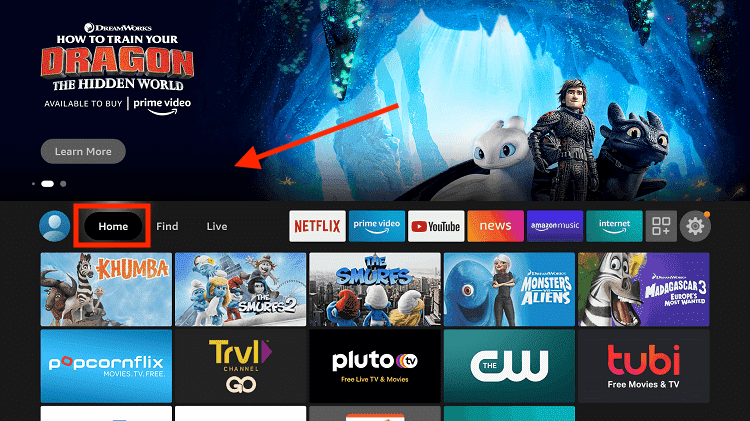
Step 3: Click on the Find tab
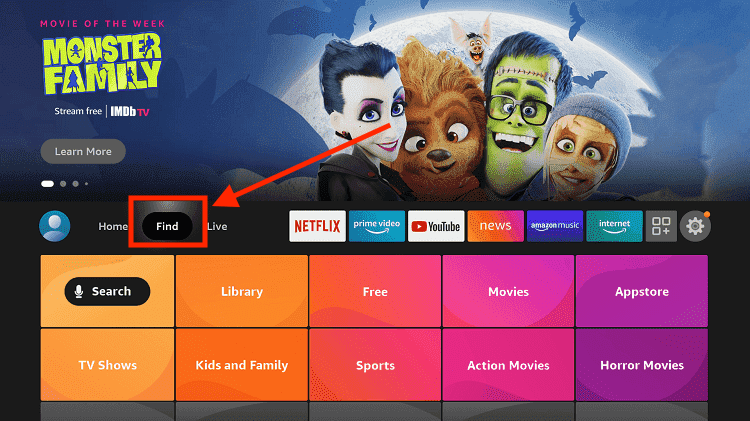
Step 4: Now select the Search option
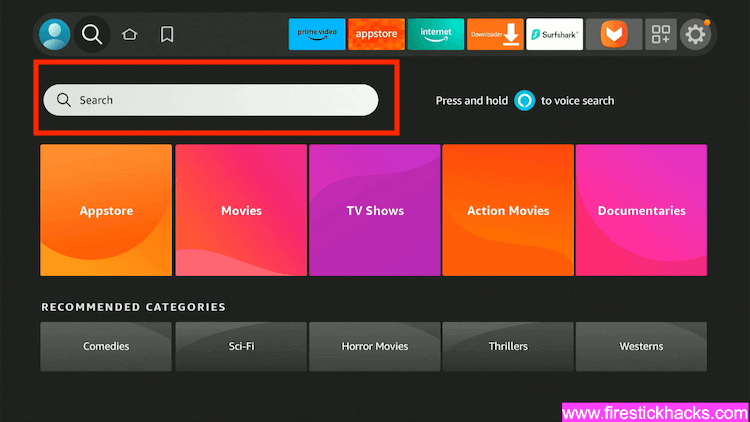
Step 5: Type Internet in the search bar and select from the list
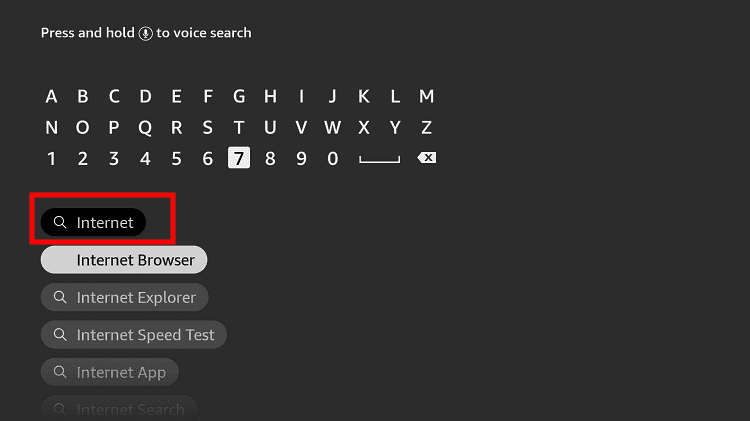
Step 6: Choose the Internet App (Silk Browser) from the given options
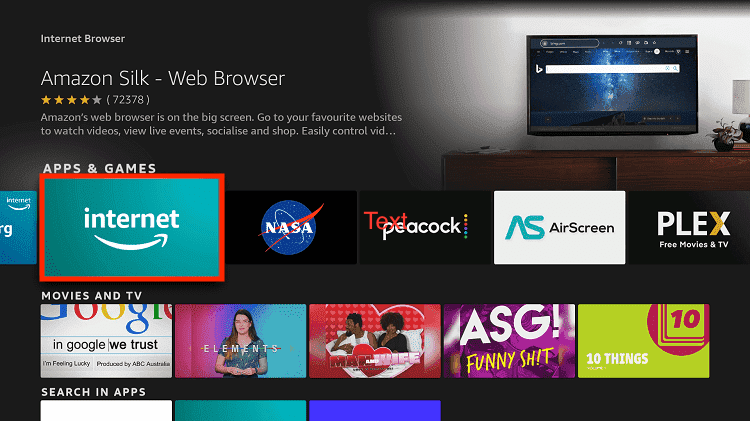
Step 7: Tap the Get/Download button
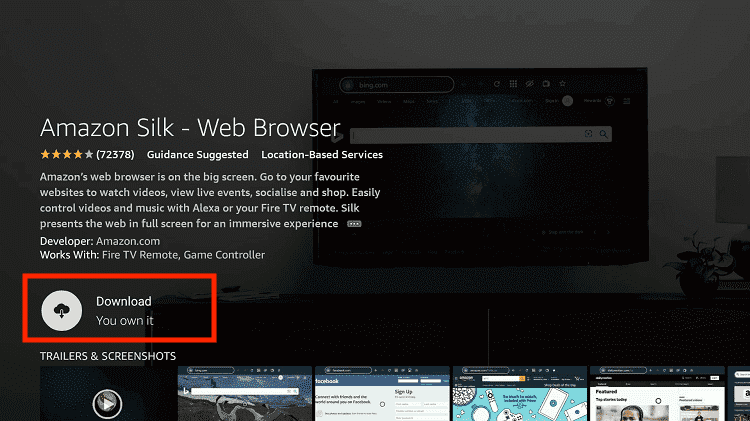
Step 8: Wait until the installation of the browser completes
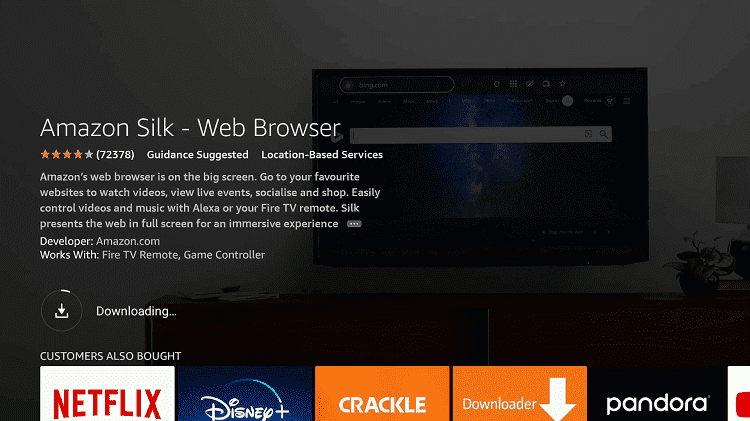
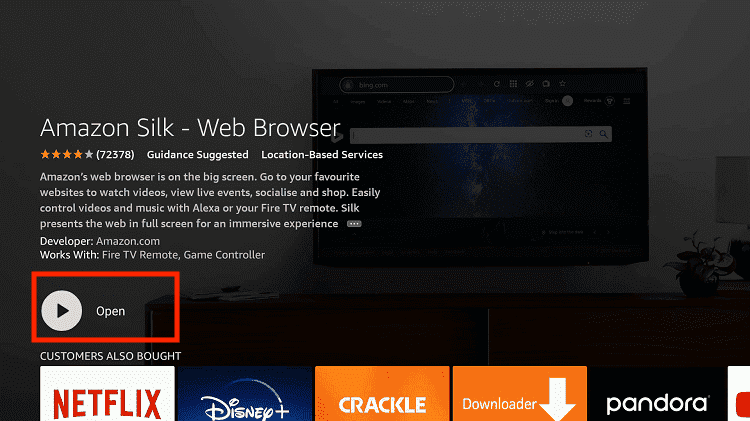
Step 9: Click Open, once the browser is installed.
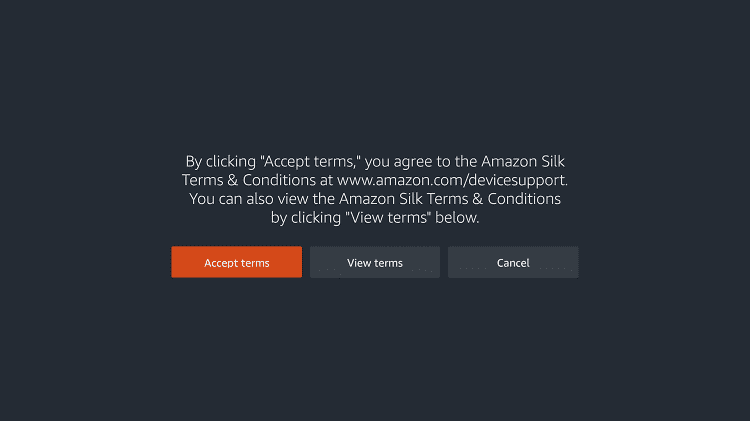
Step 10: Click on Accept Terms to access the browser
Step 11: When the browser launches, the Bing.com tab will open at first.
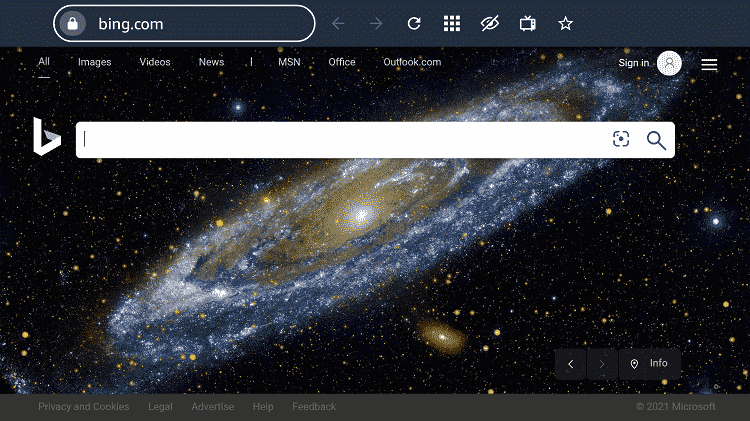
Step 12: Type the URL www.channel4.com and click “GO”.

Step 13: Tap “Sign In”.

Step 14: Enter your credentials after signing up for Channel 4.

Step 15: Choose the Great British Bake Off show.

Step 16: Tap “Play”.

Step 17: Enjoy streaming for free!

Complete List of The Great British Bake Off Winners (2010–2025)
Each season of The Great British Bake Off ends with one baker rising above the rest. Here’s every winner from Series 1 to Series 16:
| Series | Year | Winner | Highlight |
|---|---|---|---|
| 1 | 2010 | Edd Kimber | The show’s first-ever winner; now a published cookbook author. |
| 2 | 2011 | Joanne Wheatley | Opened a baking school and wrote several cookbooks. |
| 3 | 2012 | John Whaite | Became a TV chef and Strictly Come Dancing finalist. |
| 4 | 2013 | Frances Quinn | Known for artistic, design-driven bakes. |
| 5 | 2014 | Nancy Birtwhistle | Later released eco-friendly baking and cleaning guides. |
| 6 | 2015 | Nadiya Hussain | One of GBBO’s most famous winners; became a BBC presenter and author. |
| 7 | 2016 | Candice Brown | Opened a pub and appeared on Dancing on Ice. |
| 8 | 2017 | Sophie Faldo | Former Army officer turned professional baker. |
| 9 | 2018 | Rahul Mandal | Known for his scientific precision and humble personality. |
| 10 | 2019 | David Atherton | The first winner who never won “Star Baker” during the season. |
| 11 | 2020 | Peter Sawkins | Youngest-ever winner at just 20 years old. |
| 12 | 2021 | Giuseppe Dell’Anno | The show’s first Italian winner; praised for technical skill. |
| 13 | 2022 | Syabira Yusoff | Known for Malaysian-inspired fusion flavors. |
| 14 | 2023 | Matty Edgell | PE teacher with a calm, cheerful presence in the tent. |
| 15 | 2024 | Amelia Willis | Won praise for her precision and presentation (fictional future season). |
| 16 | 2025 | Jasmine Mitchell | The latest winner, celebrated for her creativity and consistency. |
Most Iconic Moments from The Great British Bake Off
Over the years, The Great British Bake Off has given us more than just perfect pastries. Here are some of the most iconic ones that fans still talk about:
✅ The “Baked Alaska” Meltdown (2014)
When Iain’s Baked Alaska melted after being removed from the freezer, he threw it in the bin – creating one of the show’s most dramatic moments, now famously dubbed “Bingate.”
✅ Nadiya Hussain’s Emotional Finale Speech (2015)
Nadiya’s tearful words: “I’m never going to put boundaries on myself again”. It remains one of the show’s most empowering moments.
✅ The Lion Bread Showstopper (2015)
Paul Jagger’s bread lion sculpture was so impressive that even Paul Hollywood called it one of the best bakes ever seen on the show.
✅ Rahul’s Glass Shattering Moment (2018)
During the final, a glass jar exploded due to heat, briefly halting filming. But Rahul powered through and went on to win the series.
✅ The First Virtual Season (2020)
During the pandemic, GBBO filmed under strict lockdown rules with contestants living in a bubble. It gave fans a comforting slice of normality when it was needed most.
✅ Matt Lucas’ Musical Opening (2020)
Kicking off the season with a parody of “Thank You, Baked Potato,” Matt Lucas brought some much-needed humor to the tent during a tough year.
✅ Giuseppe’s Italian Victory (2021)
Giuseppe Dell’Anno became the show’s first Italian winner, making it an emotional and historic finale for fans.
Other TV Shows to Watch on FireStick
If you want to watch more shows on FireStick, consider the following titles:
- DateLine on FireStick
- House of the Dragon on FireStick
- American Idol on FireStick
- Jeopardy on FireStick
- She-Hulk on FireStick
FAQs – The Great British Bake Off
Wrapping Up
Over time, The Great British Bake Off has grown from a simple baking contest into one of the UK’s most beloved television shows.
From iconic disasters like “Bingate” to unforgettable victories such as Jasmine Mitchell’s 2025 win, every season brings a fresh batch of talent and emotion to the tent.
The best part is that you don’t have to miss any of it. Channel 4 offers official access to recent seasons, while apps like OnStream let you explore the full 16 seasons for free.
Just make sure if you’re streaming Channel 4 outside the UK or using third-party apps, protect yourself with a secure VPN like Surfshark.